Thursday, 1 July 2021

SelectMany / Flattening multiple arrays at arbitrary depth in Typescript (Javascript)

I just added a flatten method of my SimpleTsLinq library today! The Github repo is at: The Npm page is at: This method can flatten multiple arrays at desired depth (defaults to Infinity) and each array itself may have arbitrary depth. The end result is that the multiple (nested arrays) are returned as a flat, single array. Much similar to SelectMany in Linq! First I added the method to generic interface Array below
 
 export { } //creating a module of below code
declare global {
  type predicate<T> = (arg: T) => boolean;
  type sortingValue<T> = (arg: T) => any;
  type keySelector<T> = (arg: T) => any;
  type resultSelector<T, TInner> = (arg: T, arg2: TInner) => any;
  interface Array<T> {
    AddRange<T>(itemsToAdd: T[]);
    InsertRange<T>(index: number, itemsToAdd: T[]);
    RemoveAt(index: number): T;
    RemoveWhere<T>(condition: predicate<T>): T[];
    FirstOrDefault<T>(condition: predicate<T>): T;
    SingleOrDefault<T>(condition: predicate<T>): T;
    First<T>(condition: predicate<T>): T;
    Single<T>(condition: predicate<T>): T;
    LastOrDefault<T>(condition: predicate<T>): T;
    Join<T, TInner>(otherArray: TInner[], outerKeySelector: keySelector<T>,
      innerKeySelector: keySelector<TInner>, res: resultSelector<T, TInner>): any[];
    Where<T>(condition: predicate<T>): T[];
    Count<T>(): number;
    CountBy<T>(condition: predicate<T>): number;
    Select<T>(...properties: (keyof T)[]): any[];
    GroupBy<T>(groupFunc: (arg: T) => string): any[];
    EnumerableRange(start: number, count: number): number[];
    Any<T>(condition: predicate<T>): boolean;
    Contains<T>(item: T): boolean;
    All<T>(condition: predicate<T>): boolean;
    MaxSelect<T>(property: (keyof T)): any;
    MinSelect<T>(property: (keyof T)): any;
    Average<T>(): number;
    AverageSelect<T>(property: (keyof T)): number;
    Max(): any;
    Min(): any;
    Sum(): any;
    Reverse<T>(): T[];
    Empty<T>(): T[];
    Except<T>(otherArray: T[]): T[];
    Intersect<T>(otherArray: T[]): T[];
    Union<T>(otherArray: T[]): T[];
    Cast<TOtherType>(TOtherType: Function): TOtherType[];
    TryCast<TOtherType>(TOtherType: Function): TOtherType[];
    GetProperties<T>(TClass: Function, sortProps: boolean): string[];
    Concat<T>(otherArray: T[]): T[];
    Distinct<T>(): T[];
    DistinctBy<T>(property: (keyof T)): any;
    SumSelect<T>(property: (keyof T)): any;
    Intersect<T>(otherArray: T[]): T[];
    IntersectSelect<T>(property: (keyof T), otherArray: T[]): T[];
    MinSelect<T>(property: (keyof T)): any;
    OrderBy<T>(sortMember: sortingValue<T>): T[];
    OrderByDescending<T>(sortMember: sortingValue<T>): T[];
    ThenBy<T>(sortMember: sortingValue<T>): T[];
    OfType<T>(compareObject: T): T[];
    SequenceEqual<T>(compareArray: T): boolean;
    Take<T>(count: number): T[];
    ToDictionary<T>(keySelector: (arg: T) => any): any;
    TakeWhile<T>(condition: predicate<T>): T[];
    SkipWhile<T>(condition: predicate<T>): T[];
    Skip<T>(count: number): T[];
    defaultComparerSort<T>(x: T, y: T);
    ElementAt<T>(index: number);
    ElementAtOrDefault<T>(index: number);
    Aggregate<T>(accumulator: any, currentValue: any, reducerFunc: (accumulator: any, currentValue: any) => any): any;
    AggregateSelect<T>(property: (keyof T), accumulator: any, currentValue: any, reducerFunc: (accumulator: any, currentValue: any) => any): any;
    Flatten<T>(otherArrays: T[][], depth: number): T[];
  }
}
 

Now we can implement the method as follows:
 
  
if (!Array.prototype.Flatten) {
  Array.prototype.Flatten = function <T>(otherArrays: T[][] = null, depth = Infinity) {
    let flattenedArrayOfThis = [...flatten(this, depth)];
    if (otherArrays == null || otherArrays == undefined) {
      return flattenedArrayOfThis;
    }
    return [...flattenedArrayOfThis, ...flatten(otherArrays, depth)];
  }
}

function* flatten(array, depth) {
  if (depth === undefined) {
    depth = 1;
  }
  for (const item of array) {
    if (Array.isArray(item) && depth > 0) {
      yield* flatten(item, depth - 1);
    } else {
      yield item;
    }
  }
}

 
The implementation uses a generator (identified by the * suffix) method which is recursively called if we have an array within an array Two tests below are run in Karma to test it out.
 
    it('can flatten multiple arrays into a single array', () => {
    let oneArray = [1, 2, [3, 3]];
    let anotherArray = [4, [4, 5], 6];
    let thirdArray = [7, 7, [7, 7]];
    let threeArrays = [oneArray, anotherArray, thirdArray];
    let flattenedArrays = oneArray.Flatten([anotherArray, thirdArray], Infinity);
    let isEqualInContentToExpectedFlattenedArray = flattenedArrays.SequenceEqual([1, 2, 3, 3, 4, 4, 5, 6, 7, 7, 7, 7]);
    expect(isEqualInContentToExpectedFlattenedArray).toBe(true);
  });

  it('can flatten one deep array into a single array', () => {
    let oneArray = [1, 2, [3, 3]];
    let flattenedArrays = oneArray.Flatten(null, 1);
    let isEqualInContentToExpectedFlattenedArray = flattenedArrays.SequenceEqual([1, 2, 3, 3]);
    expect(isEqualInContentToExpectedFlattenedArray).toBe(true);
  }); 
 

Saturday, 12 June 2021

Concepts of a simple draw ink control in Windows Forms

This article will present a simple draw ink control in Windows Forms. The code is run in Linqpad and the concepts here should be easily portable to a little application. Note - there is already built in controls for Windows Forms for this (and WPF and UWP too). That is not the point of this article. The point is to display how you can use System.Reactive and Observable.FromEventPattern method to create an event source stream from
CLR events so you can build reactive applications where the source pushes updates to its target / receiver instead of traditional pull based scenario of event subscriptions. First off, we install Linqpad from: https://www.linqpad.net I used Linqpad 5 for this code, you can of course download Linqpad 6 with .Net core support, but this article is tailored for Linpad 5 and .NET Framework. After installing Linqpad 5, start it and hit F4. Choose Add Nuget. Now choose Search online and type the following four nuget packages to get started with Reactive extensions for .NET.
  • System.Reactive
  • System.Reactive.Core
  • System.Reactive.Interfaces
  • System.Reactive.Linq
Also choose Add.. and choose System.Windows.Forms. Also, choose the tab Additional Namespace Imports. Import these namespaces
  • System.Reactive
  • System.Reactive.Linq
  • System.Windows.Forms
Over to the code, first we create a Form with a PictureBox to draw onto like this in C# program:


void Main()
{
	var form = new Form();
	form.Width = 800;
	form.Height = 800;
	form.BackColor = Color.White;
	
	var canvas = new PictureBox();
	canvas.Height = 400;
	canvas.Width = 400;
	canvas.BackColor = Color.AliceBlue;
	form.Controls.Add(canvas);
    .. //more code soon


Next up we create a list of Point to add the points to. We also use Observable.FromEventPattern to track events using the System.Reactive method to create an observable from a CLR event. We then subscribe to the three events we have set up with observables and add the logic to draw anti-aliased Bezier curves. Actually, drawing a Bezier curve usually consists of the end user defining four control points, the start and end of the bezier line and two control points (for the simplest Bezier curve). However, I chose anti-aliased Bezier curves that just uses the last four points from the dragged line, since smooth Bezier curves looks way better than using DrawLine for example for simple polylines. I use GDI CreateGraphics() method of the Picturebox (this is also available on most other Windows Forms controls, including Forms, but I wanted to have the drawing restricted to the PictureBox). The full code then is the entire code snippet below:
 
 void Main()
{
	var form = new Form { Width = 800, Height = 800, BackColor = Color.White };
	var canvas = new PictureBox { Height = 400, Width = 400, BackColor = Color.AliceBlue };
	form.Controls.Add(canvas);	
    var points = new List<Point>();
	bool isDrag = false;	
	var mouseDowns = Observable.FromEventPattern<MouseEventArgs>(canvas, "MouseDown");
	var mouseUps = Observable.FromEventPattern<MouseEventArgs>(canvas, "MouseUp");
	var mouseMoves = Observable.FromEventPattern<MouseEventArgs>(canvas, "MouseMove");
	mouseDowns.Subscribe(m =>
	{
		if (m.EventArgs.Button == MouseButtons.Right)
		{
			isDrag = false;
			points.Clear();
			canvas.CreateGraphics().Clear(Color.AliceBlue);
			return;
		}
	 isDrag = true;	 
	});	
	mouseUps.Subscribe(m => {
		isDrag = false;
	});	
	mouseMoves.Subscribe(move =>  {
	 points.Add(new Point(move.EventArgs.Location.X, move.EventArgs.Location.Y));
	 if (isDrag && points.Count > 4) {
			//form.CreateGraphics().DrawLine(new Pen(Color.Blue, 10), points[points.Count - 2].X, points[points.Count - 2].Y, points[points.Count - 1].X, points[points.Count - 1].Y);
			var pt1 = new PointF(points[points.Count - 4].X, points[points.Count - 4].Y);
			var pt2 = new PointF(points[points.Count - 3].X, points[points.Count - 3].Y);
			var pt3 = new PointF(points[points.Count - 2].X, points[points.Count - 2].Y);
			var pt4 = new PointF(points[points.Count - 1].X, points[points.Count - 1].Y);			
			var graphics = canvas.CreateGraphics();
			graphics.SmoothingMode = System.Drawing.Drawing2D.SmoothingMode.AntiAlias;
			graphics.DrawBezier(new Pen(Color.Blue, 4.0f), pt1, pt2, pt3, pt4);			
		}		
	});	
	form.Show();
}


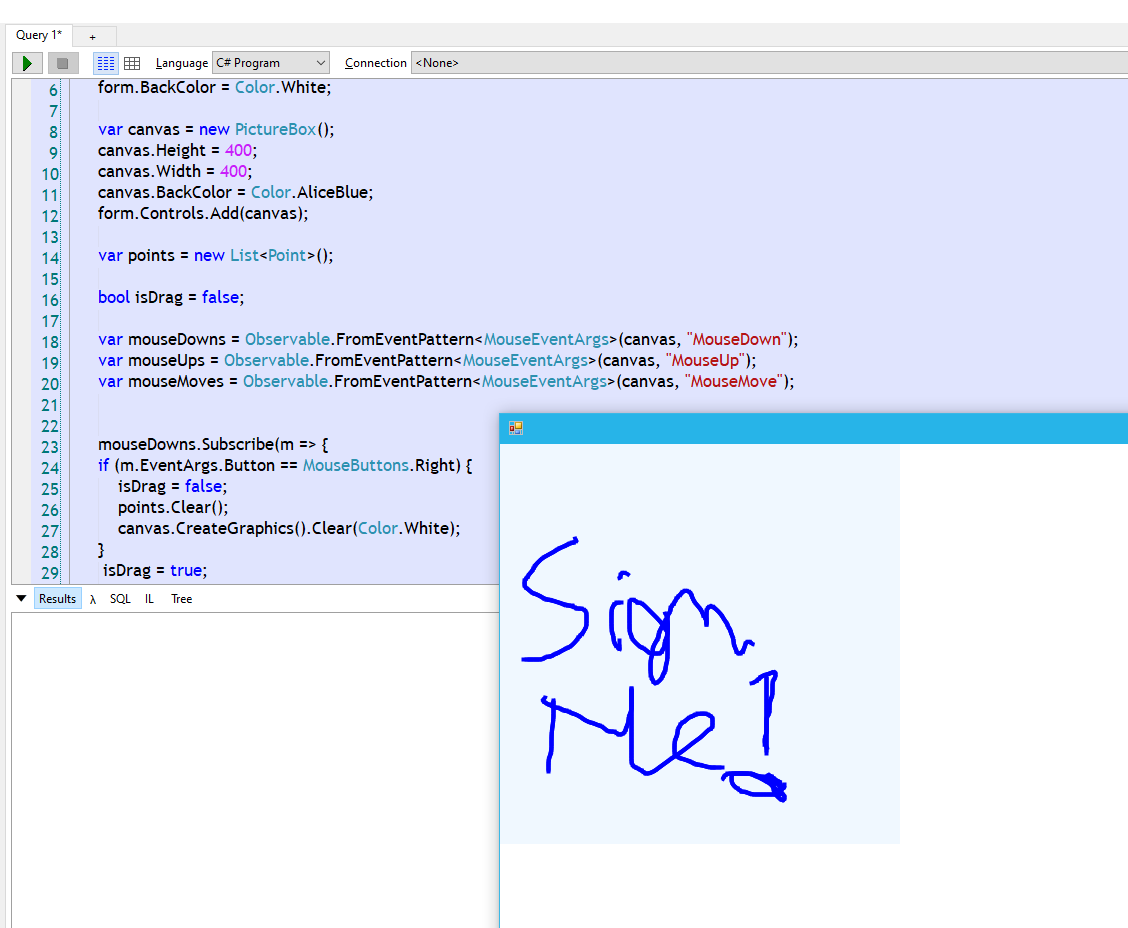
Linqpad/System.Reactive/GDI Windows Forms in action ! Screenshot:

I have added comments here for defining a polyline also instead of Bezier, since this also works and is quicker than the nicer Bezier curve. Maybe you want to display this on a simple device with less processing power etc. To clear the line, just hit right click button. To start drawing, just left click and drag and let go again. Now look how easy this code really is to create a simple Ink control in Windows Forms ! Of course Windows Forms today are more and more "dated" compared to younger frameworks, but it still does its job. WPF got its own built-in InkControl. But in case you want an Ink control in Windows Forms, this is an easy way of creating one and also a good Hello World to Reactive extensions. In .NET Core, the code should be really similar to the code above. Windows Forms is available with .NET Core 3.0 or newer. https://devblogs.microsoft.com/dotnet/windows-forms-designer-for-net-core-released/

Monday, 7 June 2021

Json serialization using Utf8JsonReaderSerializer in .net core

.NET 5 and .net core contains a lot of new methods for Json functionality in the System.Text.Json namespace. I created a helper class for reading a file using Utf8JsonReaderSerializer and this just outputs the json to a formatted json string. With optimizations, the serialization could be done even faster. For now, I need to use a conversion between StringBuilder toString to remove last commas of arrays and properties of objects as the Utf8JsonReaderSerializer is sequential, forward-only as mentioned in the API page at: https://docs.microsoft.com/en-us/dotnet/api/system.text.json.utf8jsonreader?view=net-5.0
This is the helper method I came up with to read a file and take the way via Utf8JsonReaderSerializer:
 

using System;
using System.IO;
using System.Linq;
using System.Text;
using System.Text.Json;

namespace SystemTextJsonTestRun
{
    public static class Utf8JsonReaderSerializer
    {

        public static string ReadFile(string filePath)
        {         
            if (!File.Exists(filePath))
            {
                throw new FileNotFoundException(filePath);
            }

            var jsonBytes = File.ReadAllBytes(filePath);
            var jsonSpan = jsonBytes.AsSpan();
            var json = new Utf8JsonReader(jsonSpan);
            var sb = new StringBuilder();

            while (json.Read())
            {
                if (json.TokenType == JsonTokenType.StartObject)
                {
                    sb.Append(Environment.NewLine);
                }
                else if (json.TokenType == JsonTokenType.EndObject)
                {
                    //remove last comma added 

                    sb.RemoveLast(",");

                    sb.Append(Environment.NewLine);
                }

                if (json.CurrentDepth > 0)
                {
                    for (int i = 0; i < json.CurrentDepth; i++)
                    {
                        sb.Append(" "); //space indentation
                    }
                }

                sb.Append(GetTokenRepresentation(json));


                if (json.TokenType == JsonTokenType.EndObject || json.TokenType == JsonTokenType.EndArray)
                {
                    sb.AppendLine();
                }

                if (new[] { JsonTokenType.String, JsonTokenType.Number, JsonTokenType.Null, JsonTokenType.False,
                JsonTokenType.Number, JsonTokenType.None, JsonTokenType.True }.Contains(json.TokenType))
                {
                    sb.AppendLine(",");
                }

            }

            //remove last comma for EndObject 

            sb.RemoveLast(",");

            return sb.ToString(); 


        }


        private static string GetTokenRepresentation(Utf8JsonReader json) =>
          json.TokenType switch
          {
              JsonTokenType.StartObject => $"{{{Environment.NewLine}",
              JsonTokenType.EndObject => "},",
              JsonTokenType.StartArray => $"[{Environment.NewLine}",
              JsonTokenType.EndArray => $"]",
              JsonTokenType.PropertyName => $"\"{json.GetString()}\":",
              JsonTokenType.Comment => json.GetString(),
              JsonTokenType.String => $"\"{json.GetString()}\"",
              JsonTokenType.Number => GetNumberToString(json),
              JsonTokenType.True => json.GetBoolean().ToString().ToLower(),
              JsonTokenType.False => json.GetBoolean().ToString().ToLower(),
              JsonTokenType.Null => string.Empty,
              _ => "Unknown Json token type"
          };

        //TODO: Use the Try methods of the Utf8JsonReader more than trying and failing here 

        private static string GetNumberToString(Utf8JsonReader json)
        {
            try
            {
                if (int.TryParse(json.GetInt32().ToString(), out var res))
                    return res.ToString();
            }
            catch
            {
                try
                {
                    if (float.TryParse(json.GetSingle().ToString(), out var resFloat))
                        return resFloat.ToString();
                }
                catch
                {
                    try
                    {
                        if (decimal.TryParse(json.GetDouble().ToString(), out var resDes))
                            return resDes.ToString();
                    }
                    catch
                    {
                        return "?";
                    }
                }
            }
            return $"?"; //fallback to a string if not possible to deduce the type
        }

    }
}


The json file I tested the code with inputted came out again as this string:

{
 "courseName": "Build Your Own Application Framework",
 "language": "C#",
 "author":
 {
  "firstName":  "Matt",
  "lastName":  "Honeycutt"

 },
 "publishedAt": "2012-03-13T12:30:00.000Z",
 "publishedYear": 2014,
 "isActive": true,
 "isRetired": false,
 "tags": [
  "aspnet",
  "C#",
  "dotnet"
 ]

}

This code validates against Json Lint also: https://jsonlint.com Now why even bother parsing a Json file just to output the file again to a json string? Well, first of all, we use a very fast parser Utf8JsonReader from .NET and we can for example do various processing along the forward-only sequential processing and formatting indented the file. Utf8JsonReader will also validate the json document strictly to the Json specification - RFC 8259. Hence, we can get validation for free here to by catching any errors and returning true or false in method that scans this file by adding a method for this looking at the json.Read() method (if it returns false) or catching JsonException if a node of the json document does not validate. Also, a low level analysis of the Utf8JsonReader let's you see which different tokens of the json document structure .NET provides. We could transform the document or add specific formatting and so on by altering the code displayed here. To run the code test with a sample json document like this:

   class Program
    {
        static void Main(string[] args)
        {
            Console.WriteLine("Utf8JsonReader sample");

            string json = Utf8JsonReaderSerializer.ReadFile("sample.json");
            string tempFile = Path.ChangeExtension(Path.GetTempFileName(), "json"); 
            File.WriteAllText(tempFile, json);
            Console.WriteLine($"Json file read and processed result in location: {tempFile}");
            Console.WriteLine($"Json file contents: {Environment.NewLine}{json}");

        
        }

I have added the code for this here: https://github.com/toreaurstadboss/Utf8DataJsonReaderTest/

Sunday, 25 April 2021

Making NUnit tests run in Team City for NUnit 3.x

Team City has several bugs when it comes to running NUnit tests. The following guide shows how you can prepare the Team City build agent to run NUnit 3.x tests. We need first to install NUnit Console runner Tips around this was found in the following Stack Overflow thread: This is also mentioned in the documentation of Team City: First off, add two Command line steps and add the two commands into each step - this step can be run at the start of the pipeline in Team City.


%teamcity.tool.NuGet.CommandLine.DEFAULT%\tools\nuget.exe install NUnit.Console -version 3.10.0 -o packages  -ExcludeVersion -OutputDirectory %system.teamcity.build.tempDir%\NUnit %teamcity.tool.NuGet.CommandLine.DEFAULT%\tools\nuget.exe install NUnit.Extension.NUnitProjectLoader -version 3.6.0 -o packages
The following Nuget packages for NUnit was used:
  • NUnit 3.2.0
  • NUnit.ConsoleRunner 3.10.0
  • NUnit.Extension.NUnitProjectLoader 3.6.0
  • NUnit.Extension.TeamCityEventListener 1.0.7
  • NUnit3TestAdapter 3.16.1
Inside the NUnit runner type step, configure also the NUnit console path: Use this path:
packages\NUnit.ConsoleRunner.3.8.0\tools\nunit3-console.exe For the testassemblies make sure you use a path like this: **\bin\%BuildConfiguration%\*.Test.dll Add the %BuildConfiguration% parameter and set it to: Debug
More tips here: https://stackoverflow.com/questions/57953724/nunit-teamcity-process-exited-with-code-4

And here:
https://stackoverflow.com/questions/36996564/nunit-3-2-1-teamcity-could-not-load-file-or-assembly-nunit-framework

Sunday, 18 April 2021

Implementing a Strip method with regex in C#

This article will present a Strip method that accepts a Regex which defines the pattern of allowed characters. It is similar to Regex Replace, but it works in the inverted way. Instead of removing the chars matching the pattern in Regex.Replace, this utility method instead lets you define the allowed chars, i.e. these chars defined in this regex are the chars I want to keep. First off we define the utility method, as an extension method.
 

        /// <summary>
        /// Strips away every character not defined in the provided regex <paramref name="allowedChars"/>
        /// </summary>
        /// <param name="s">Input string</param>
        /// <param name="allowedChars">The allowed characters defined in a Regex with pattern, for example: [A-z|0-9]+/</param>
        /// <returns>Input string with only the allowed characters</returns>
        public static string Strip(this string s, Regex allowedChars)
        {
            if (s == null)
            {
                return s;
            }
            if (allowedChars == null)
            {
                return string.Empty;
            }
            Match match = Regex.Match(s, allowedChars.ToString());
            List<char> allowedAlphabet = new List<char>();
            while (match.Success)
            {
                if (match.Success)
                {
                    for (int i = 0; i < match.Groups.Count; i++)
                    {
                        allowedAlphabet.AddRange(match.Groups[i].Value.ToCharArray());
                    }
                }
                match = match.NextMatch();
            }
            return new string(s.Where(ch => allowedAlphabet.Contains(ch)).ToArray());
        }
        
          
Here are some tests that tests out this Strip method:
 
 
 	 	[Test]
        [TestCase("abc123abc", "[A-z]+", "abcabc")]
        [TestCase("abc123def456", "[0-9]+", "123456")]
     	[TestCase("The F-32 Lightning II is a newer generation fighter jets than the F-16 Fighting Falcon", "[0-9]+", "3216")]
		[TestCase("Here are some Norwegian letters : ÆØÅ and in lowercase: æøå", "[æ|ø|å]", "æøå")]
		public void TestStripWithRegex(string input, string regexString, string expectedOutput)
        {
            var regex = new Regex(regexString);
            input.Strip(regex).Should().Be(expectedOutput);
        }


Monday, 1 March 2021

Implementing ToDictionary in Typescript

In this article I will present some code I just did in my SimpleTsLinq library, which you can easily install using Npm. The library is here on Npmjs.com : The ToDictionary method looks like this:

  
  if (!Array.prototype.ToDictionary) {
  Array.prototype.ToDictionary = function <T>(keySelector: (arg: T) => any): any {
    let hash = {};
    this.map(item => {
      let key = keySelector(item);
      if (!(key in hash)) {
        hash[key] = item;
      }
      else {
        if (!(Array.isArray(hash[key]))) {
          hash[key] = [hash[key]];
        }
        hash[key].push(item);
      }
    });
    return hash;
  }
}
  

Here is a unit test (spec) for this method :

  
    it('can apply method ToDictionary on an array, allowing specificaton of a key selector for the dictionary object', () => {
    let heroes = [{ name: "Han Solo", age: 47, gender: "M" }, { name: "Leia", age: 29, gender: "F" }, { name: "Luke", age: 24, gender: "M" }, { name: "Lando", age: 47, gender: "M" }];
    let dictionaryOfHeroes = heroes.ToDictionary<Hero>(x => x.gender);

    let expectedDictionary = {
      "F": {
        name: "Leia", age: 29, gender: "F"
      },
      "M": [
        { name: "Han Solo", age: 47, gender: "M" },
        { name: "Luke", age: 24, gender: "M" },
        { name: "Lando", age: 47, gender: "M" }
      ]
    };
    expect(dictionaryOfHeroes).toEqual(expectedDictionary);
  });


You can also test out this library using Npm RunKit here: We can make a dictionary with different keys, image example:

Friday, 5 February 2021

Overcoming limitations in Contains in Entity Framework

Entity Framework will hit a performance penalty bottleneck or crash if Contains contains a too large of a list. Here is how you can avoid this, using Marc Gravell's excellent approach in this. I am including some tests of this. I also suggest you consider LinqKit to use expandable queries to make this all work. First off, this class contains the extension methods for Entity Framework for this:
 
 
 public class EntityExtensions {
 
 /// <summary>
        /// This method overcomes a weakness with Entity Framework with Contains where you can partition the values to look for into 
        /// blocks or partitions, it is modeled after Marc Gravell's answer here:
        /// https://stackoverflow.com/a/568771/741368
        /// Entity Framework hits a limit of 2100 parameter limit in the DB but probably comes into trouble before this limit as even
        /// queries with several 100 parameters are slow.
        /// </summary>
        /// <typeparam name="T"></typeparam>
        /// <typeparam name="TValue"></typeparam>
        /// <param name="source">Source, for example DbSet (table)</param>
        /// <param name="selector">Selector, key selector</param>
        /// <param name="blockSize">Size of blocks (chunks/partitions)</param>
        /// <param name="values">Values as parameters</param>
        /// 
        /// <example>
        ///   /// <[!CDATA[
        /// /// The following EF query will hit a performance penalty or time out if EF gets a too large list of operationids:
        /// ///
        /// /// var patients = context.Patients.Where(p => operationsIds.Contains(p.OperationId)).Select(p => new {
        /// ///  p.OperationId,
        /// ///  p.
        /// /// });
        /// ///
        /// /// 
        /// /// var patients = context.Patients.AsExpandable().InRange(p => p.OperationId, 1000, operationIds)
        /// //.Select(p => new
        /// //{
        /// //    p.OperationId,
        /// //    p.IsDaytimeSurgery
        /// //}).ToList();
        /// //]]
        /// </example>
        /// <returns></returns>
        public static IEnumerable<T> InRange<T, TValue>(
                this IQueryable<T> source,
                Expression<Func<T, TValue>> selector,
                int blockSize,
                IEnumerable<TValue> values)
        {
            MethodInfo method = null;
          
            foreach (MethodInfo tmp in typeof(Enumerable).GetMethods(
                    BindingFlags.Public | BindingFlags.Static))
            {
                if (tmp.Name == "Contains" && tmp.IsGenericMethodDefinition
                        && tmp.GetParameters().Length == 2)
                {
                    method = tmp.MakeGenericMethod(typeof(TValue));
                    break;
                }
            }

            if (method == null) throw new InvalidOperationException(
                   "Unable to locate Contains");
            foreach (TValue[] block in values.GetBlocks(blockSize))
            {
                var row = Expression.Parameter(typeof(T), "row");
                var member = Expression.Invoke(selector, row);
                var keys = Expression.Constant(block, typeof(TValue[]));
                var predicate = Expression.Call(method, keys, member);
                var lambda = Expression.Lambda<Func<T, bool>>(
                      predicate, row);
                foreach (T record in source.Where(lambda))
                {
                    yield return record;
                }
            }

        }

        /// <summary>
        /// Similar to Chunk, it partitions the IEnumerable source and returns the chunks or blocks by given blocksize. The last block can have variable length
        /// between 0 to blocksize since the IEnumerable can have of course variable size not evenly divided by blocksize. 
        /// </summary>
        /// <typeparam name="T"></typeparam>
        /// <param name="source"></param>
        /// <param name="blockSize"></param>
        /// <returns></returns>
        public static IEnumerable<T[]> GetBlocks<T>(
                this IEnumerable<T> source, int blockSize)
        {
            List<T> list = new List<T>(blockSize);
            foreach (T item in source)
            {
                list.Add(item);
                if (list.Count == blockSize)
                {
                    yield return list.ToArray();
                    list.Clear();
                }
            }
            if (list.Count > 0)
            {
                yield return list.ToArray();
            }
        }
        
  }


Linqkit allows us to rewrite queries for EF using expression trees. One class is ExpandableQuery. See the links here for further info about Linqkit and Linq-Expand.
 
  	/// <summary>Refer to http://www.albahari.com/nutshell/linqkit.html and
	/// http://tomasp.net/blog/linq-expand.aspx for more information.</summary>
	public static class Extensions
	{
		public static IQueryable<T> AsExpandable<T> (this IQueryable<T> query)
		{
			if (query is ExpandableQuery<T>) return (ExpandableQuery<T>)query;
			return new ExpandableQuery<T> (query);
		}
 
This all seems to look a bit cryptic, so lets see an integration test of mine instead:


        [Test]
        [Category(TestCategories.IntegrationTest)]
        public void GetDataChunkedDoesNotFail()
        {
            using (var context = DbContextManager.ScopedOpPlanDataContext)
            {
                int[] operationalUnitIds = new int[]{ 107455, 105431, 107646, 107846 };
                var reportItems = context.OperationalUnits.AsExpandable().InRange(ou => ou.FreshOrganizationalUnitId, 2, operationalUnitIds).ToList();
                Assert.IsNotNull(reportItems);           
                CollectionAssert.IsNotEmpty(reportItems); 
            }
        }


This shows how to use the InRange method of Marc Gravell. We use the AsExpandable method to allow us to hack into the expression tree of Entity Framework and the InRange method allows us to partition the work for EF. We do not know the siz of operational unit ids (usually it is low and another entity - operation Ids is of variable length and will in production blow up since we in some cases surpass the 2100 limit of Contains). And as I said before, Entity Framework will hit a performance bottleneck before 2100 parameteters are sent into the Contains method. This way of fixing it up will allow you to get stable running code in production again against large data and variable length. This code is tested with Entity Framework 6.2.0. Another article considers performance considerations for Contains and different approaches here: https://www.toptal.com/dot-net/entity-framework-performance-using-contains IMHO this approach has proven stable in a production environment for several years with large data and can be considered a stable workaround for EF slow Contains performance. I have made the LinqKit fork LinqKit.AsyncSupport available on Nuget here now: https://www.nuget.org/packages/ToreAurstadIt.LinqKit.AsyncSupport/1.1.0 This makes it possible to perform Async calls and expandable queries, i.e. queries with inline method calls for example. The nuget package now also sports symbol package for easier debugging experience. The source code for LinqKit.AsyncSupport is available here: https://github.com/toreaurstadboss/LinqKit.AsyncSupport

Thursday, 31 December 2020

Simple property grid in Blazor

This artile will present a simple property grid in Blazor I have made. The component relies on standard stuff like Bootstrap, jQuery, Twitter Bootstrap and Font Awesome. But the repo url shown here links to the Github repo of mine which can be easily forked if you want to add features (such as editing capabilities). The component already supports nested levels, so if the object you inspect has a hierarchical structure, this is shown in this Blazor component. Having a component to inspect objects in Blazor is great as Blazor lacks inspect tools (since the app is compiled into a web assembly, we cannot easily inspect state of objects in the app other than the DOM and Javascript objects. With this component we can get basic inspection support to inspect state of the object in the app you desire to inspect). The Github repo contains also a bundled application which uses the component and shows a sample use-case (also shown in Gif video below). I have tested the component with three levels of depth for a sample object (included in the repo). The component is available here on my Github repo:
 
 git clone https://github.com/toreaurstadboss/BlazorPropertyGrid/tree/main/BlazorPropertyGrid
 
https://github.com/toreaurstadboss/BlazorPropertyGrid/tree/main/BlazorPropertyGrid
The component consists of two components where one of them is used in a recursive manner to support nested object structure. The top level component got this code-behind class.
PropertyGridComponentBase.cs
using System.Collections.Generic; using System.Reflection; using Microsoft.AspNetCore.Components; using Microsoft.AspNetCore.Components.Web; using Microsoft.JSInterop; namespace BlazorPropertyGridComponents.Components { public class PropertyGridComponentBase : ComponentBase { [Inject] public IJSRuntime JsRuntime { get; set; } [Parameter] public object DataContext { get; set; } public Dictionary<string, PropertyInfoAtLevelNodeComponent> Props { get; set; } public PropertyGridComponentBase() { Props = new Dictionary<string, PropertyInfoAtLevelNodeComponent>(); } protected override void OnParametersSet() { Props.Clear(); if (DataContext == null) return; Props["ROOT"] = MapPropertiesOfDataContext(string.Empty, DataContext, null); StateHasChanged(); } private bool IsNestedProperty(PropertyInfo pi) => pi.PropertyType.IsClass && pi.PropertyType.Namespace != "System"; private PropertyInfoAtLevelNodeComponent MapPropertiesOfDataContext(string propertyPath, object parentObject, PropertyInfo currentProp) { if (parentObject == null) return null; var publicProperties = parentObject.GetType() .GetProperties(BindingFlags.Public | BindingFlags.Instance); var propertyNode = new PropertyInfoAtLevelNodeComponent { PropertyName = currentProp?.Name ?? "ROOT", PropertyValue = parentObject, PropertyType = parentObject.GetType(), FullPropertyPath = TrimFullPropertyPath($"{propertyPath}.{currentProp?.Name}") ?? "ROOT", IsClass = parentObject.GetType().IsClass && parentObject.GetType().Namespace != "System" }; foreach (var p in publicProperties) { var propertyValue = p.GetValue(parentObject, null); if (!IsNestedProperty(p)) { propertyNode.SubProperties.Add(p.Name, new PropertyInfoAtLevelNodeComponent { IsClass = false, FullPropertyPath = TrimFullPropertyPath($"{propertyPath}.{p.Name}"), PropertyName = p.Name, PropertyValue = propertyValue, PropertyType = p.PropertyType //note - SubProperties are default empty if not nested property of course. } ); } else { //we need to add the sub property but recurse also call to fetch the nested properties propertyNode.SubProperties.Add(p.Name, new PropertyInfoAtLevelNodeComponent { IsClass = true, FullPropertyPath = propertyPath + p.Name, PropertyName = p.Name, PropertyValue = MapPropertiesOfDataContext(TrimFullPropertyPath($"{propertyPath}.{p.Name}"), propertyValue, p), PropertyType = p.PropertyType //note - SubProperties are default empty if not nested property of course. } ); } } return propertyNode; } protected void toggleExpandButton(MouseEventArgs e, string buttonId) { JsRuntime.InvokeVoidAsync("toggleExpandButton", buttonId); } private string TrimFullPropertyPath(string fullpropertypath) { if (string.IsNullOrEmpty(fullpropertypath)) return fullpropertypath; return fullpropertypath.TrimStart('.').TrimEnd('.'); } } }
And its razor file looks like this:
PropertyGridComponentBase.razor
@inherits PropertyGridComponentBase @using BlazorPropertyGridComponents.Components <table class="table table-striped col-md-4 col-lg-3 col-sm-6"> <thead> <tr> <th scope="col">Property</th> <th scope="col">Value</th> </tr> </thead> <tbody> @foreach (KeyValuePair<string, PropertyInfoAtLevelNodeComponent> prop in Props) { @if (!prop.Value.IsClass) { @* <tr> <td>@prop.Key</td> <td>@prop.Value</td> </tr>*@ } else { var currentNestedDiv = "currentDiv_" + prop.Key; var currentProp = prop.Value.PropertyValue; //must be a nested class property <tr> <td colspan="2"> <button type="button" id="@prop.Key" class="btn btn-info fas fa-minus" @onclick="(e) => toggleExpandButton(e,prop.Key)" data-toggle="collapse" data-target="#@currentNestedDiv"> </button> <div id="@currentNestedDiv" class="collapse show"> <PropertyRowComponent Depth="1" PropertyInfoAtLevel="@prop.Value" /> </div> </td> </tr> } } </tbody> </table> @code { }
We also have this helper class to model each property in the nested structure:
PropertyInfoAtLevelNodeComponent.cs
using System; using System.Collections.Generic; namespace BlazorPropertyGridComponents.Components { /// <summary> /// Node class for hierarchical structure of property info for an object of given object graph structure. /// </summary> public class PropertyInfoAtLevelNodeComponent { public PropertyInfoAtLevelNodeComponent() { SubProperties = new Dictionary<string, PropertyInfoAtLevelNodeComponent>(); } public string PropertyName { get; set; } public object PropertyValue { get; set; } public Type PropertyType { get; set; } public Dictionary<string, PropertyInfoAtLevelNodeComponent> SubProperties { get; private set; } public string FullPropertyPath { get; set; } public bool IsClass { get; set; } } }
Our lower component used by the top component code-behind looks like this:
PropertyRowComponentBase.cs
using System.Collections.Generic; using Microsoft.AspNetCore.Components; using Microsoft.AspNetCore.Components.Web; using Microsoft.JSInterop; namespace BlazorPropertyGridComponents.Components { public class PropertyRowComponentBase : ComponentBase { public PropertyRowComponentBase() { DisplayedFullPropertyPaths = new List<string>(); } [Parameter] public PropertyInfoAtLevelNodeComponent PropertyInfoAtLevel { get; set; } [Parameter] public int Depth { get; set; } [Parameter] public List<string> DisplayedFullPropertyPaths { get; set; } [Inject] protected IJSRuntime JsRunTime { get; set; } protected void toggleExpandButton(MouseEventArgs e, string buttonId) { JsRunTime.InvokeVoidAsync("toggleExpandButton", buttonId); } } }
The razor file looks like this:
PropertyRowComponent.razor
@using BlazorPropertyGridComponents.Components @inherits PropertyRowComponentBase @foreach (var item in PropertyInfoAtLevel.SubProperties.Keys) { var propertyInfoAtLevel = PropertyInfoAtLevel.SubProperties[item]; if (propertyInfoAtLevel != null) { @* if (DisplayedFullPropertyPaths.Contains(propertyInfoAtLevel.FullPropertyPath)){ continue; //the property is already displayed. }*@ DisplayedFullPropertyPaths.Add(propertyInfoAtLevel.FullPropertyPath); @* <span class="text-white bg-dark">@propertyInfoAtLevel.FullPropertyPath</span>*@ @* <em> @propertyInfoAtLevel </em>*@ } if (!propertyInfoAtLevel.PropertyType.IsClass || propertyInfoAtLevel.PropertyType.Namespace.StartsWith("System")) { <tr> <td> <span title="@propertyInfoAtLevel.FullPropertyPath" class="font-weight-bold">@propertyInfoAtLevel.PropertyName</span> </td> <td> <span>@propertyInfoAtLevel.PropertyValue</span> </td> </tr> } else if (propertyInfoAtLevel.PropertyValue != null && propertyInfoAtLevel.PropertyValue is PropertyInfoAtLevelNodeComponent) { var nestedLevel = (PropertyInfoAtLevelNodeComponent)propertyInfoAtLevel.PropertyValue; var collapseOrNotCssClass = Depth == 0 ? "collapse show" : "collapse"; var curDepth = Depth + 1; collapseOrNotCssClass += " depth" + Depth; var currentNestedDiv = "collapsingdiv_" + propertyInfoAtLevel.PropertyName; //must be a nested class property <tr> <td colspan="2"> <span>@propertyInfoAtLevel.PropertyName</span> <button id="@propertyInfoAtLevel.FullPropertyPath" type="button" @onclick="(e) => toggleExpandButton(e,propertyInfoAtLevel.FullPropertyPath)" class="fas btn btn-info fa-plus" data-toggle="collapse" data-target="#@currentNestedDiv"></button> <div id="@currentNestedDiv" class="@collapseOrNotCssClass"> <PropertyRowComponent PropertyInfoAtLevel="@nestedLevel" Depth="@curDepth" /> </div> </td> </tr> } } @code { }

Monday, 28 December 2020

More fun with Blazor - creating a folder viewer in 10 minutes

 
   git clone https://github.com/toreaurstadboss/BlazorLiveReloadSample.git 
 
Blazor is very easy to use! I spent 10 minutes to create a simple folder viewer here now.
First off, the Blazor razor component looks like this:
FilewView.razor
@inject IJSRuntime jsRuntime; <h3>FileView</h3> @foreach (var folder in folders) { var depthOfFolder = folder.Split('\\').Count(); <p style="cursor:pointer" @onclick="() => openFolder(folder)"> @for (int i = 0; i < depthOfFolder; i++) { <span style="margin-left:10px"></span> } <i style="color:orange;cursor:pointer" class="fa fa-folder" /> @folder </p> } @code { List<string> folders = Directory.GetDirectories("/").ToList(); private void openFolder(string folder) { jsRuntime.InvokeVoidAsync("log", folder); string[] subfolders = Directory.GetDirectories(folder); Console.WriteLine(folder); int folderIndex = folders.IndexOf(folder); folders.InsertRange(folderIndex, subfolders); } }
We add to the solution also Font-awesome via right click solution explorer and choose Add => Client-Side Library. Search for 'font-awesome' Choose Font Awesome and add all files to be added to the lib/font-awesome folder of wwwroot. Then at the bottom of _Host.cshtml we add:
 
_Host.cshtml
<link rel="stylesheet" href="~/lib/font-awesome/css/all.css" />
Now we have access to the Font Awesome icons.

Live reloads for Blazor - and a simple clock component

This article will test out Blazor. I had some difficulties with getting live reload to work. I got it working in Visual Studio 2019 for the Blazor Asp.Net Core project template. We will also create a very simple component (a clock) that calls Javascript function from C#. You can clone the simple app of mine from Github like this:
 
 
 git clone https://github.com/toreaurstadboss/BlazorLiveReloadSample.git
 
 
First off, we add the following into _host.cshtml :
 
_Host.cshtml
<script src="js/script.js"></script> <script src="_framework/blazor.server.js"></script> <script> Blazor.defaultReconnectionHandler._reconnectCallback = function (d) { document.location.reload(); } </script>
The Blazor.defaultReconnectionHandler._reconnectCallback is set to reload the document location This makes the page reload when you edit the razor files of the Blazor app. You will see this as a temporarily recompile step - give it some 5 seconds in a simple app.
Let's for fun add a clock component also. Add to the Shared folder the file Clock.razor.
 
Clock.razor
@inject IJSRuntime JsRunTime @implements IDisposable

The time is now:

00:00:00
@code { ElementReference timeDiv; protected override async Task OnAfterRenderAsync(bool firstRender) { if (firstRender) { await JsRunTime.InvokeVoidAsync("startTime", timeDiv); } } public void Dispose() { JsRunTime.InvokeVoidAsync("stopTime"); } }
And we have also the script.js file in wwwroot to add some Javascript (Blazor razor files dont like Js in the component itself, just make sure to add the Js somewhere in wwwroot instead which loads up the necessary Js). As you can see we inject with the @inject in the razor Blazor file (rhymes a bit) the IJsRunTime. This allows us to call client-side code from the C# code. We start off the clock with a setTimeout and stop the clock with a clearTimeout.
 
Clock.razor
var clock; function startTime(element) { let timeString = new Date().toLocaleTimeString('nb-No', { hour: 'numeric', hour12: false, minute: 'numeric', second: 'numeric' }); element.innerHTML = timeString; clock = setTimeout(startTime.bind(null, element), 1000); } function stopTime() { clearTimeout(clock); }

Friday, 25 December 2020

Generic memory cache and middleware in Asp.Net Core

In this article I will present code for creating added functionality to IMemoryCache in Asp.Net Core or in Net.Core in general. The code has been tested in Asp.Net Core 3.1. I have tested out a Generic memory cache and creating middleware for adding items and removing and listing values. Usually you do not want to expose caching to a public api, but perhaps your api resides in a safe(r) intranet zone and you want to cache different objects. This article will teach you the principles upon building a generic memory cache for (asp).net core and to wire up cache functionality to rest api(s). The code of this article is available on Github:

 git clone https://github.com/toreaurstadboss/GenericMemoryCacheAspNetCore.git

We start with our Generic Memory cache. It has some features:
  • The primary feature is to offer generic functionality and STRONGLY TYPED access to the IMemoryCache
  • Strongly typed access means you can use the cache (memory) as a repository and easily add, remove, update and get multiple items in a strongly typed fashion and easily add compound objects (class instances or nested objects, what have you - whatever you want here (as long as it is serializable to Json would be highly suggested in case you want to use the Generic Memory Cache together with REST apis)
  • You add homogenous objects of the same type to a prefixed part of the cache (by prefixed keys) to help avoid collisions in the same process
  • If you add the same key twice, the item will not be added again - you must update instead
  • Additional methods exists for removing, updating and clearing the memory cache.
  • The Generic memory cache wraps IMemoryCache in Asp.Net Core which will do the actual caching in memory on the workstation or server in use for your application.
GenericMemoryCache.cs
using Microsoft.Extensions.Caching.Memory; using Microsoft.Extensions.Primitives; using System; using System.Collections.Generic; using System.Diagnostics; using System.Linq; using System.Threading; namespace SomeAcme.SomeUtilNamespace { /// <summary> /// Thread safe memory cache for generic use - wraps IMemoryCache /// </summary> /// <typeparam name="TCacheItemData">Payload to store in the memory cache</typeparam> /// multiple paralell importing sessions</remarks> public class GenericMemoryCache<TCacheItemData> : IGenericMemoryCache<TCacheItemData> { private readonly string _prefixKey; private readonly int _defaultExpirationInSeconds; private static readonly object _locker = new object(); public GenericMemoryCache(IMemoryCache memoryCache, string prefixKey, int defaultExpirationInSeconds = 0) { defaultExpirationInSeconds = Math.Abs(defaultExpirationInSeconds); //checking if a negative value was passed into the constructor. _prefixKey = prefixKey; Cache = memoryCache; _defaultExpirationInSeconds = defaultExpirationInSeconds; } /// <summary> /// Cache object if direct access is desired. Only allow exposing this for inherited types. /// </summary> protected IMemoryCache Cache { get; } public string PrefixKey(string key) => $"{_prefixKey}_{key}"; //to avoid IMemoryCache collisions with other parts of the same process, each cache key is always prefixed with a set prefix set by the constructor of this class. /// <summary> /// Adds an item to memory cache /// </summary> /// <param name="key"></param> /// <param name="itemToCache"></param> /// <returns></returns> public bool AddItem(string key, TCacheItemData itemToCache) { try { if (!key.StartsWith(_prefixKey)) key = PrefixKey(key); lock (_locker) { if (!Cache.TryGetValue(key, out TCacheItemData existingItem)) { var cts = new CancellationTokenSource(_defaultExpirationInSeconds > 0 ? _defaultExpirationInSeconds * 1000 : -1); var cacheEntryOptions = new MemoryCacheEntryOptions().AddExpirationToken(new CancellationChangeToken(cts.Token)); Cache.Set(key, itemToCache, cacheEntryOptions); return true; } } return false; //Item not added, the key already exists } catch (Exception err) { Debug.WriteLine(err); return false; } } public virtual List<T> GetValues<T>() { lock (_locker) { var values = Cache.GetValues<ICacheEntry>().Where(c => c.Value is T).Select(c => (T)c.Value).ToList(); return values; } } /// <summary> /// Retrieves a cache item. Possible to set the expiration of the cache item in seconds. /// </summary> /// <param name="key"></param> /// <returns></returns> public TCacheItemData GetItem(string key) { try { if (!key.StartsWith(_prefixKey)) key = PrefixKey(key); lock (_locker) { if (Cache.TryGetValue(key, out TCacheItemData cachedItem)) { return cachedItem; } } return default(TCacheItemData); } catch (Exception err) { Debug.WriteLine(err); return default(TCacheItemData); } } public bool SetItem(string key, TCacheItemData itemToCache) { try { if (!key.StartsWith(_prefixKey)) key = PrefixKey(key); lock (_locker) { if (GetItem(key) != null) { AddItem(key, itemToCache); return true; } UpdateItem(key, itemToCache); } return true; } catch (Exception err) { Debug.WriteLine(err); return false; } } /// <summary> /// Updates an item in the cache and set the expiration of the cache item /// </summary> /// <param name="key"></param> /// <param name="itemToCache"></param> /// <returns></returns> public bool UpdateItem(string key, TCacheItemData itemToCache) { if (!key.StartsWith(_prefixKey)) key = PrefixKey(key); lock (_locker) { TCacheItemData existingItem = GetItem(key); if (existingItem != null) { //always remove the item existing before updating RemoveItem(key); } AddItem(key, itemToCache); } return true; } /// <summary> /// Removes an item from the cache /// </summary> /// <param name="key"></param> /// <returns></returns> public bool RemoveItem(string key) { if (!key.StartsWith(_prefixKey)) key = PrefixKey(key); lock (_locker) { if (Cache.TryGetValue(key, out var item)) { if (item != null) { } Cache.Remove(key); return true; } } return false; } public void AddItems(Dictionary<string, TCacheItemData> itemsToCache) { foreach (var kvp in itemsToCache) AddItem(kvp.Key, kvp.Value); } /// <summary> /// Clear all cache keys starting with known prefix passed into the constructor. /// </summary> public void ClearAll() { lock (_locker) { List<string> cacheKeys = Cache.GetKeys<string>().Where(k => k.StartsWith(_prefixKey)).ToList(); foreach (string cacheKey in cacheKeys) { if (cacheKey.StartsWith(_prefixKey)) Cache.Remove(cacheKey); } } } } }
There are different ways of making use of the generic memory cache above. The simplest use-case would be to instantiate it in a Controller and add cache items as wanted. As you can see the Generic Memory cache offers strongly typed access to the memory cache. Lets look at how we can register the Memory Cache as a service too.
startup.cs
// This method gets called by the runtime. Use this method to add services to the container. public void ConfigureServices(IServiceCollection services) { services.AddControllers(); services.AddMemoryCache(); services.AddSingleton<GenericMemoryCache<WeatherForecast>>(genmen => new GenericMemoryCache<WeatherForecast>(new MemoryCache(new MemoryCacheOptions()), "WEATHER_FORECASTS", 120)); }
In the sample above we register as a singleton (memory is either way shared so making a transient or scoped generic memory cache would be less logical) and register the memory cache above. We can then inject it like this :
WeatherForecastController.cs
private readonly GenericMemoryCache<WeatherForecast> _genericMemoryCache; public WeatherForecastController(ILogger<WeatherForecastController> logger, GenericMemoryCache<WeatherForecast> genericMemoryForecast) { _logger = logger; _genericMemoryCache = genericMemoryForecast; if (_logger != null) { } }
This way of injecting the generic memory cache is cumbersome, since we need to have a more dynamic way of specfifying the type of the memory cache. We could register the type of the generic memory cache to object, but then we loose the strongly typing by boxing the items in the cache to object. Instead, I have looked into defining a custom middleware for working against the generic memory cache. Of course you would in production add some protection against this cache so it cannot be readily available for everyone, such as a token or similar to be added into the REST api calls. The middleware shown next is just a suggestion how we can build up a generic memory cache in asp.net core via rest api calls. It should be very handy in case you have consumers / clients that have data they want to store into a cache on-demand. The appliances of this could be endless in an asp.net core environment. That is if you would offer such functionality. In many cases, you would otherwise use my GenericMemoryCache more directly where needed and not expose it. But for those who want to see how it can be made available in a REST api, the following middleware offers a suggestion.
Startup.cs
// This method gets called by the runtime. Use this method to configure the HTTP request pipeline. public void Configure(IApplicationBuilder app, IWebHostEnvironment env) { if (env.IsDevelopment()) { app.UseDeveloperExceptionPage(); } .. app.UseGenericMemoryCache(new GenericMemoryCacheOptions { PrefixKey = "volvoer", DefaultExpirationInSeconds = 600 }); ..
We call first the UseGenericMemoryCache to just register the middlware and we initially also set up the PrefixKey to "volvoer" and default expiration in seconds to ten minutes. But we will instead just use Postman to send some rest api calls to build up contents of the cache instead afterwards. The UseMiddleware extension method is used in the extension method that is added to offer this functionality:
GenericMemoryCacheExtensions.cs
using Microsoft.AspNetCore.Builder; namespace SomeAcme.SomeUtilNamespace { public static class GenericMemoryCacheExtensions { public static IApplicationBuilder UseGenericMemoryCache<TItemData>(this IApplicationBuilder builder, GenericMemoryCacheOptions options) where TItemData: class { return builder.UseMiddleware<GenericMemoryCacheMiddleware<TItemData>>(options); } } }
The middleware looks like this (it could be easily extended to cover more functions of the API):
GenericMemoryCacheMiddleware.cs
using Microsoft.AspNetCore.Http; using Microsoft.Extensions.Caching.Memory; using Newtonsoft.Json; using System; using System.IO; using System.Text; using System.Threading.Tasks; namespace SomeAcme.SomeUtilNamespace { public class GenericMemoryCacheMiddleware<TCacheItemData> where TCacheItemData: class { private readonly RequestDelegate _next; private readonly string _prefixKey; private readonly int _defaultExpirationTimeInSeconds; public GenericMemoryCacheMiddleware(RequestDelegate next, GenericMemoryCacheOptions options) { if (options == null) { throw new ArgumentNullException(nameof(options)); } _next = next; _prefixKey = options.PrefixKey; _defaultExpirationTimeInSeconds = options.DefaultExpirationInSeconds; } public async Task InvokeAsync(HttpContext context, IMemoryCache memoryCache) { context.Request.EnableBuffering(); //do this to be able to re-read the body multiple times without consuming it. (asp.net core 3.1) if (context.Request.Method.ToLower() == "post") { if (IsDefinedCacheOperation("addtocache", context)) { // Leave the body open so the next middleware can read it. using (var reader = new StreamReader( context.Request.Body, encoding: Encoding.UTF8, detectEncodingFromByteOrderMarks: false, bufferSize: 4096, leaveOpen: true)) { var body = await reader.ReadToEndAsync(); // Do some processing with body if (body != null) { string cacheKey = context.Request.Query["cachekey"].ToString(); if (context.Request.Query.ContainsKey("type")) { var typeArgs = CreateGenericCache(context, memoryCache, out var cache); var payloadItem = JsonConvert.DeserializeObject(body, typeArgs[0]); var addMethod = cache.GetType().GetMethod("AddItem"); if (addMethod != null) { addMethod.Invoke(cache, new[] {cacheKey, payloadItem}); } } else { var cache = new GenericMemoryCache<object>(memoryCache, cacheKey, 0); if (cache != null) { //TODO: implement } } } } // Reset the request body stream position so the next middleware can read it context.Request.Body.Position = 0; } } if (context.Request.Method.ToLower() == "delete") { if (IsDefinedCacheOperation("removeitemfromcache", context)) { var typeArgs = CreateGenericCache(context, memoryCache, out var cache); var removeMethod = cache.GetType().GetMethod("RemoveItem"); string cacheKey = context.Request.Query["cachekey"].ToString(); if (removeMethod != null) { removeMethod.Invoke(cache, new[] { cacheKey }); } } } if (context.Request.Method.ToLower() == "get") { if (IsDefinedCacheOperation("getvaluesfromcache", context)) { var typeArgs = CreateGenericCache(context, memoryCache, out var cache); var getValuesMethod = cache.GetType().GetMethod("GetValues"); if (getValuesMethod != null) { var genericGetValuesMethod = getValuesMethod.MakeGenericMethod(typeArgs); var existingValuesInCache = genericGetValuesMethod.Invoke(cache, null); if (existingValuesInCache != null) { context.Response.ContentType = "application/json"; await context.Response.WriteAsync(JsonConvert.SerializeObject(existingValuesInCache)); } else { context.Response.ContentType = "application/json"; await context.Response.WriteAsync("{}"); //return empty object literal } return; //terminate further processing - return data } } } await _next(context); } private static bool IsDefinedCacheOperation(string cacheOperation, HttpContext context, bool requireType = true) { return context.Request.Query.ContainsKey(cacheOperation) && context.Request.Query.ContainsKey("prefix") && (!requireType || context.Request.Query.ContainsKey("type")); } private static Type[] CreateGenericCache(HttpContext context, IMemoryCache memoryCache, out object cache) { Type genericType = typeof(GenericMemoryCache<>); string cacheitemtype = context.Request.Query["type"].ToString(); string prefix = context.Request.Query["prefix"].ToString(); Type[] typeArgs = {Type.GetType(cacheitemtype)}; Type cacheType = genericType.MakeGenericType(typeArgs); cache = Activator.CreateInstance(cacheType, memoryCache, prefix, 0); return typeArgs; } } }
The middleware above for now supports adding items to the cache and removing them or listing them up. I have used this busines model to test it out:
 
  namespace GenericMemoryCacheAspNetCore.Models
{

    public class Car
    {
        public Car()
        {
            NumberOfWheels = 4;
        }

        public string Make { get; set; }
        public string Model { get; set; }
        public int NumberOfWheels { get; set; }
    }

}

 
The following requests were tested to add three cars and then delete one and then list them up:
 
  # add three cars
  POST https://localhost:44391/caching/addcar?addtocache&prefix=volvoer&cachekey=240&type=GenericMemoryCacheAspNetCore.Models.Car,GenericMemoryCacheAspNetCore
  POST https://localhost:44391/caching/addcar?addtocache&prefix=volvoer&cachekey=Amazon&type=GenericMemoryCacheAspNetCore.Models.Car,GenericMemoryCacheAspNetCore
  POST https://localhost:44391/caching/addcar?addtocache&prefix=volvoer&cachekey=Pv&type=GenericMemoryCacheAspNetCore.Models.Car,GenericMemoryCacheAspNetCore
  
  #remove one
  DELETE https://localhost:44391/caching?removeitemfromcache&prefix=volvoer&cachekey=Amazon&&type=GenericMemoryCacheAspNetCore.Models.Car,GenericMemoryCacheAspNetCore
  
  # list up the cars in the cache (items)
  GET https://localhost:44391/caching/addcar?getvaluesfromcache&prefix=volvoer&type=GenericMemoryCacheAspNetCore.Models.Car,GenericMemoryCacheAspNetCore
 
 
About the POST, I have posted payloads in the body via postman such as this:
 
  {
    Make: "Volvo",
    Model: "Amazon"
  }
 
Finally, we can see that we get the cached data in our generic memory cache. As you can see, the REST api specifies the type arguments by specifying the type name with namespaces and after the comma, also the asembly name (fully qualified type name). So this way of building a generic memory cache via rest api is fully feasible in asp.net core. However, it should only be used in scenarios where such functionality is desired and the clients can be trusted in some way (or by restricing access to such functionality only to priviledged users via a token or other functionality.) You would of course never allow clients to just send over data to a server's memory cache only to see it bogged down by memory. That was not the purpose of this article. The purpose was to acquaint the reader more with IMemoryCache, Generic Memory cache and middlware in Asp.Net Core. A generic memory cache will give you strongly typed access to memory cache in asp.net core and the concepts shown here in .net core should be similar.

Sunday, 20 December 2020

Outputting runnable SQL from Entity Framework 6.x

This article will describe how you can output runnable SQL from Entity Framework. The output will be sent to the Console and Debug. You can easily modify this to output to other output sources, such as tracing or files for that matter. What is important is that we need to interpolate the parameters from Entity Framework so that we get a runnable SQL. Entity Framework parameterizes the SQL queries such that SQL injection is avoided. Where conditions and similar are inserted into parameters, notably with the p__linq naming convention. We will interpolate these parameters into runnable SQL such that you can paste SQL into SQL Server Management Studio (SMSMS). Or you could save the runnable SQL to a .sql file and let SQLCMD run it from command line. Either way, we must set up the DbContext to do this. I am using Entity Framework 6.2.0. It should be possible to use this technique with all EF 6.x version. In Entity Framework Core and Entity Framework Core 2, the techniques will be similar. First define a DbConfiguration and attribute the DbContext class you are using like this with the DbConfigurationType (we are not considering ObjectContext in this article, but DbContext is a wrapper around this class anyways, so you should be apply to techniques taught here to other scenarios).
SomeAcmeDbContext.cs
namespace SomeAcme.Data.EntityFramework { [DbConfigurationType(typeof(SomeAcmeDataContextConfiguration))] public partial class SomeAcmeDataContext : System.Data.Entity.DbContext, ISomeAcmeDataContext { ..
Ok, so our DbConfiguration just inherits from DbConfiguration and sets up a custom DatabaseLogFormatter like this:
  
SomeAcmeDataContextConfiguration.cs
using System.Data.Entity; namespace SomeAcme.Data.EntityFramework.DbContext { public class SomeAcmeDataContextConfiguration : DbConfiguration { public SomeAcmeDataContextConfiguration() { SetDatabaseLogFormatter((context, logAction) => new SomeAcmeDbLogFormatter(context, logAction)); } } }
SetDatabaseLogFormatter is a protected method o DbConfiguration. Our DatabaseLogFormatter implementation then looks like this:
 
SomeAcmeDbLogFormatter.cs
using System; using System.Data.Common; using System.Data.Entity.Infrastructure.Interception; using SomeAcme.Data.EntityFramework.DbContext.Extensions; namespace SomeAcme.Data.EntityFramework.DbContext { public class SomeAcmeDbLogFormatter : DatabaseLogFormatter { public SomeAcmeDbLogFormatter(System.Data.Entity.DbContext dbContext, Action<string> loggingAction) : base(dbContext, loggingAction) { } public override void LogCommand<TResult>(DbCommand command, DbCommandInterceptionContext<TResult> interceptionContext) { string cmdText = command.CommandText; if (string.IsNullOrEmpty(cmdText)) return; if (cmdText.StartsWith("Openend connection", StringComparison.InvariantCultureIgnoreCase) || cmdText.StartsWith("Closed connection", StringComparison.InvariantCultureIgnoreCase)) return; Write($"--DbContext {Context.GetType().Name} is executing command against DB {Context.Database.Connection.Database}: {Environment.NewLine}{command.GetGeneratedQuery().Replace(Environment.NewLine, "")} {Environment.NewLine}"); } public override void LogResult<TResult>(DbCommand command, DbCommandInterceptionContext<TResult> interceptionContext) { //empty by intention } } }
We also have a helper extension method called GetGeneratedQuery on DbCommand objects to help us get the cruft of this article - the interpolated runnable query. From my testing we can just interpolate the parameters as is in most use cases. However, some datatypes in the T-SQL world must be quoted (like, strings) and we need to adjust the date and time data types to a runnable format too. In case you find this helper method should be interpolated, please let me know. Our helper method GetGeneratedQuery looks like this:
  
SomeAcmeDbCommandExtensions.cs
using System; using System.Data; using System.Data.Common; using System.Data.SqlClient; using System.Linq; using System.Text; namespace SomeAcme.Data.EntityFramework.DbContext.Extensions { public static class DbCommandExtensions { /// <summary> /// Returns the generated sql string where parameters are replaced by value. Generated a runnable /// SQL script. Note that this is an approximation anwyays, but gives us a runnable query. The database server query engine optimizer will possible rewrite /// even simple queries if it sees it possible to rearrange the query to predictively create a more efficient query. /// </summary> /// <param name="dbCommand"></param> /// <returns></returns> public static string GetGeneratedQuery(this DbCommand dbCommand) { DbType[] quotedParameterTypes = new DbType[] { DbType.AnsiString, DbType.Date, DbType.DateTime, DbType.DateTime2, DbType.Guid, DbType.String, DbType.AnsiStringFixedLength, DbType.StringFixedLength }; var sb = new StringBuilder(); sb.AppendLine(dbCommand.CommandText); var arrParams = new SqlParameter[dbCommand.Parameters.Count]; dbCommand.Parameters.CopyTo(arrParams, 0); //copy dbCommand parameters into another collection to avoid //mutating the query and be able to run a foreach loop foreach (SqlParameter p in arrParams.OrderByDescending(p => p.ParameterName.Length)) { string value = p.Value.ToString(); if (p.DbType == DbType.Date || p.DbType == DbType.DateTime || p.DbType == DbType.DateTime2) { value = DateTime.Parse(value).ToString("yyyy-MM-dd HH:mm:ss.fff"); } if (quotedParameterTypes.Contains(p.DbType)) value = "'" + value + "'"; sb.Replace("@" + p.ParameterName, value); } return sb.ToString(); } } }
We also need to activate database logging in the first place. Database logging to the console and debug should be avoided in production in ordinary cases, as they make a performance impact. Instead, it is handy to turn it on or off via an app setting. I have decided to only allow it while debugging so my constructors of my DbContext where I have tested it calls this method:
SomeAcmeDbContext.cs
(once more need to add some code) private void SetupDbContextBehavior() { Configuration.AutoDetectChangesEnabled = true; Configuration.LazyLoadingEnabled = true; ObjectContext.CommandTimeout = 10 * 60; #if DEBUG //To enable outputting database traffic to the console, set the app setting OutputDatabaseTrafficLogging in web.config to true //this must not be activated in production. To safe guard this, //this block below is wrapped in the debug preprocessor directive. bool outputDatabaseTrafficLogging = ConfigurationManagerWrapper.GetAppsetting(SomeAcme.Common.Constants.OutputDatabaseTrafficLogging); if (outputDatabaseTrafficLogging) { Database.Log = s => { if (s.StartsWith("Opened connection", StringComparison.InvariantCultureIgnoreCase) || s.StartsWith("Closed connection", StringComparison.InvariantCultureIgnoreCase)) return; Console.WriteLine(s); Debug.WriteLine(s); }; } #endif
Never mind the first three lines, they are just added here as tips for additional settings you CAN set if you want to. The important bit is the Database.Log delegate property, which acceps a lambda for example where you set up what to do with the logging. Here we just tell the DbContext that if the app setting OutputDatabaseTrafficLogging is set to true, we output the runnable SQL from Entity Framework to the console. That's all there is to it! You can now activate the app setting and see in the debug output (or in console) runnable SQL. And you can paste the SQL into SMSS for example to check for performance issues such as missing indexes and similar or tune up the size of the result sets and alter the SQL. You should also consider making your DbContext runnable in Linqpad for easier tuning of EF queries, but that is for another article. Happy coding!

Saturday, 19 December 2020

Running Angular on a fixed port on Windows platform

This article is for Angular developers running on a Windows platform. We will use Windows domain tools such as netstat and Powershell in this article. A cross platform version of Powershell exist. I have not tested this approach on other OS-es, such as Linux. Linux developers using Angular (if any) might follow my approach here with success, it is is possible to do this in a similar manner on *nix systems. Also note that this article is meant for those using Angular SPA with .Net Core. This is the standard setup for Windows platform and Angular development. When developing an Angular app locally, sometimes you want to run on a fixed port. For example, your app might federate its access towards ADFS (Active Directory Federated Services) and you desire to have a fixed port. This makes it possible to set up a callback url that can be fixed and not have the standard setup with a random port that Angular and webpack sets up for you. Here is how I managed to achieve to override this and set up a fixed port. First off, we need to create a short Powershell script with a function to stop (kill) the processes running at a given port with the following contents:


KillAngularApp.ps1
param ( [Parameter(Mandatory=$true)][string] $portToFind ) # This PS script requires the paramter $portToFind to be passed into it pwd Write-Host Probing for Angular App running at $portToFind $runningEudAppProcessLocal = 'netstat -ano | findstr "$portToFind"' $arr = Invoke-Expression $runningEudAppProcessLocal # $runningEudAppProcessLocal $arr = $arr -split '\s+' Write-Host Probing complete: $arr if ($arr.Length -ge 5) { $runningAngularAppPort = $arr[5] $runningAngularAppPort Write-Host Killing the process.. $killScript = "taskkill /PID $runningAngularAppPort /F" Invoke-Expression $killScript Write-Host probing once more $arr = Invoke-Expression $runningEudAppProcessLocal if ($arr.Length -eq 0){ Write-Host There is no running process any more at $portToFind } }
The powershell script above runs 'netstat ano -findstr "someportnumber"'. It finds the PID at that port and splits the result using the '\s+' expression, i.e. whitespace. If we find a PID (process id), we stop that process using the 'taskkill' command with the '-force' flag. We then need to have a C# class that .Net Core can call. The code here has been tested with .Net Core 3.0 and 3.1 successfully.


KillAngularPortHelper.cs
using Microsoft.Extensions.Configuration; using Microsoft.Extensions.Hosting; using System; using System.Diagnostics; namespace EndUserDevice { public static class AngularKillPortHelper { /// <summary> /// Kills Angular app running with for example node at configured port Host:SpaPort /// </summary> public static void KillPort() { try { string environmentName = Environment.GetEnvironmentVariable("ASPNETCORE_ENVIRONMENT"); string configFile = environmentName == Environments.Development ? "appsettings.json" : environmentName == Environments.Staging ? "appsettings.Staging.json" : environmentName == Environments.Production ? "appsettings.Production.json" : "appsettings.json"; // Set up configuration sources. var config = new ConfigurationBuilder() .AddJsonFile(configFile, optional: false) .Build(); string angularAppPort = config.GetValue<string>("Configuration:Host:SpaPort"); if (environmentName == Environments.Development) { string killAngularAppRunningAtPortMessage = $"Trying to shutdown existing running Angular SPA if it is running at reserved fixed port: {angularAppPort}"; Debug.WriteLine(killAngularAppRunningAtPortMessage); Console.WriteLine(killAngularAppRunningAtPortMessage); //requires Nuget Packages: //Microsoft.Powershell.SDK //System.Management.Automation string ps1File = config.GetValue<string>("Configuration:Host:CloseSpaPortScriptPath"); var startInfo = new ProcessStartInfo(); startInfo.FileName = "powershell.exe"; startInfo.Arguments = "-noprofile \"& \"\"" + ps1File + "\"\"\""; startInfo.Arguments += " -portToFind " + angularAppPort; startInfo.UseShellExecute = false; //WARNING!!! If the powershell script outputs lots of data, this code could hang //You will need to output using a stream reader and purge the contents from time to time startInfo.RedirectStandardOutput = !startInfo.UseShellExecute; startInfo.RedirectStandardError = !startInfo.UseShellExecute; //startInfo.CreateNoWindow = true; var process = new System.Diagnostics.Process(); process.StartInfo = startInfo; process.Start(); process.WaitForExit(3*1000); //if you want to limit how long you wait for the program to complete //input is in milliseconds //var seconds_to_wait_for_exit = 120; //process.WaitForExit(seconds_to_wait_for_exit * 1000); string output = ""; if (startInfo.RedirectStandardOutput) { output += "Standard Output"; output += Environment.NewLine; output += process.StandardOutput.ReadToEnd(); } if (startInfo.RedirectStandardError) { var error = process.StandardError.ReadToEnd(); if (!string.IsNullOrWhiteSpace(error)) { if (!string.IsNullOrWhiteSpace(output)) { output += Environment.NewLine; output += Environment.NewLine; } output += "Error Output"; output += Environment.NewLine; output += error; } } Console.WriteLine(output); Debug.WriteLine(output); } } catch (Exception err) { Console.WriteLine(err); } } } }
Finally we can configure our app to use the ports we want to use like this:

appsettings.json
"Configuration": { "Host": { "SpaPort": "44394", "ApiPort": "44364", "CloseSpaPortScriptPath": "c:\\dev\\someapp\\somesubdir\\KillAngularApp.ps1" }, }
The ApiPort here is not used by our code in our article. The SpaPort however is used. We then call this helper class like this in Program.cs of our asp.net core application hosting the Angular Spa:

Program.cs
public class Program { public static void Main(string[] args) { AngularKillPortHelper.KillPort(); IWebHost host = CreateWebHostBuilder(args).Build(); host.Run(); } //..
This makes sure that the port is ready and not buy by another app (such as your previous debugging session of the app!) and by killing the app running with node at that port, we make
sure that Angular can run at a fixed port. Are we done yet? No! We must also update the package.json file to use that port we want to use! This must correspond to the port we configure in the appsettings.json file to kill in the first place. (i.e. make sure the port is freely available and not busy)

package.json
{ "name": "enduserdevice", "version": "0.0.0", "scripts": { "ng": "ng", "start": "ng serve -o --ssl true --ssl-key /node_modules/browser-sync/certs/server.key --ssl-cert /node_modules/browser-sync/certs/server.crt --port=44394 &REM", "build": "ng build --base-href /eud/ --source-map --prod", "build-staging": "ng build --base-href /eud/ --source-map --staging", "build-mobile": "ng build --base-href /eud2/ --source-map -c mobile", "prod-build-dev": "ng build --prod --source-map --base-href /eud/ --prod", "build:ssr": "ng run EndUserDevice:server:dev", "test": "ng test", "lint": "ng lint", "e2e": "ng e2e" },
Never mind much of the setup above, the important bit to make note of here is the part: --port=44394 &REM The adjustments of the ng start script makes sure we use a fixed port of our Angular app. Sadly, as you can see - this is not easily configurable as we hard code it into our package.json. Maybe we could set this up as an environment variable in a Angular environment file.. ? Hope you found this article interesting. Having a fixed port is always handy when developing locally Angular app and you do no not like this random port thingy that is default set up otherwise. Works on my PC!