Saturday, 22 April 2023

Tag Helpers in Asp.net Core Mvc 7

This article will present a sample Tag Helper in .net. A Tag Helper is similar to Html Helpers in Asp.net Mvc in .NET Framework, but it is easier to use in HTML as it does not use the special "@-syntax". The Tag helper will render a list using the <ul> and <li> tags. In addition, Bootstrap 5 will be used. Start by creating a razor application with this command:
dotnet new razor -o TagHelpers Then move into the folder TagHelpers and type: code .

Inside Visual Studio Code, hit Ctrl+P and look up the file _ViewImports.cshtml and add the current assembly/solution using:

@addTagHelper *, TagHelpers

This tells that we want to add any TagHelper from the assembly called TagHelpers (the solution we are working with).

@using TagHelpers
@namespace TagHelpers.Pages
@addTagHelper *, Microsoft.AspNetCore.Mvc.TagHelpers
@addTagHelper *, TagHelpers

Consider the following HTML :

<list separator="|">option 1| option 2| option 3| option 4| option 5| option 6| option 7| option 8|this is fun<list>
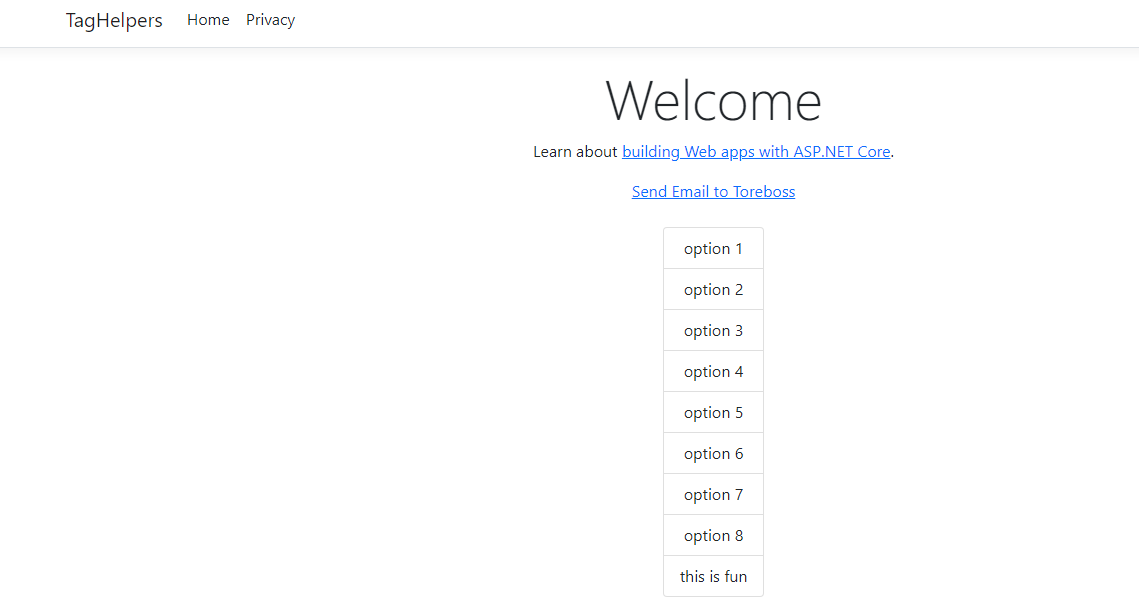
We want to turn that HTML into the list shown in screen shot below :
That is - create a list using an <ul> tag followed by <li> tags inside. Since we need to access the inner content of the HTML here, we have to use ProcessAsync method of derived method from the TagHelper. We create a TagHelper by inheriting from this class and we also have to name the class suffixed by TagHelper by convention. The resulting Tag Helper then looks like this:


using System.Text;
using Microsoft.AspNetCore.Razor.TagHelpers;

namespace TagHelpers.TagHelpers;

public class ListTagHelper : TagHelper {

    public override async Task ProcessAsync(TagHelperContext context, TagHelperOutput output)
    {
        output.TagName = "ul";
        output.Attributes.Add("class", "list-group");
        output.Attributes.Add("style", "display:inline-block"); 
        var existingContent = await output.GetChildContentAsync(); 
        var allContent = existingContent.GetContent();
        var items = allContent.Trim().Split(new[] { Separator }, StringSplitOptions.None);
        var outputHtml = new StringBuilder();
        foreach (var item in items){
            outputHtml.Append($@"<li class=""list-group-item"">{item}</li>");
        }
        output.Content.SetHtmlContent(outputHtml.ToString());        
    }
    public string Separator { get; set; } = ",";
}


We default set the property Separator default to "," to separate items in our list. We could use another separator, such as "|" shown in the markup. If you omit the Separator, "," will be default used. Each public property becomes a recognized attribute in your TagHelper and can be used in the HTML. The TagName is the tag that will be used in the HTML. As we see, we also add 'class' and 'style' attributes here to show a list-group in HTML using Bootstrap 5 classes. We also split the items using the separator, make not that we use the GetChildContentAsync() method on the TagHelperOutput output object, followed by GetContent() method call. Also note that we have to use SetHtmlContent method in case we want to add explicit html content in the content of our 'a' tag here. It is suggested that you stick to string properties in Razor tag helpers instead of other data types.

Monday, 3 April 2023

Using Azure Cognitive Services to summarize articles

I have added a repo on Github for a web scraping app written in .NET MAUI Blazor. It uses Azure Cognitive Services to summarize articles. https://github.com/toreaurstadboss/DagbladetWebscrapper The web scrapper uses the Nuget package for Html agility pack to handle the DOM after downloading articles from the Internet. As the name of the repo suggests, it can be used to read for example Dagbladet articles, without having to waddle through ads. 'Website Scraping' is a term that means extracting data from web sites, or content in general. The following libraries are used in the Razor lib containing the text handling methods to scrap web pages:

<PackageReference Include="Azure.AI.TextAnalytics" Version="5.3.0" />
<PackageReference Include="HtmlAgilityPack" Version="1.11.52" />
<PackageReference Include="Microsoft.AspNetCore.Components.Web" Version="6.0.19" />
Let's first look at the SummarizationUtil class. This uses TextAnalyticsClient in Azure.AI.TextAnalytics. We will summarize articles into five sentence summaries using the
Azure AI text analytics client.


using Azure.AI.TextAnalytics;
using System.Text;

namespace Webscrapper.Lib
{
	public class SummarizationUtil : ISummarizationUtil
	{

		public async Task<List<ExtractiveSummarizeResult>> GetExtractiveSummarizeResult(string document, TextAnalyticsClient client)
		{
			var batchedDocuments = new List<string>
			{
				document
			};
			var result = new List<ExtractiveSummarizeResult>();
			var options = new ExtractiveSummarizeOptions
			{
				 MaxSentenceCount = 5
			};
			var operation = await client.ExtractiveSummarizeAsync(Azure.WaitUntil.Completed, batchedDocuments, options: options);
			await foreach (ExtractiveSummarizeResultCollection documentsInPage in operation.Value)
			{
				foreach (ExtractiveSummarizeResult documentResult in documentsInPage)
				{
					result.Add(documentResult);
				}
			}
			return result;
		}

		public async Task<string> GetExtractiveSummarizeSentectesResult(string document, TextAnalyticsClient client)
		{
			List<ExtractiveSummarizeResult> summaries = await GetExtractiveSummarizeResult(document, client);
			return string.Join(Environment.NewLine, summaries.Select(s => s.Sentences).SelectMany(x => x).Select(x => x.Text));
		}

	}

}

We set up the extraction here to return a maximum of five sentences. Note the use of await foreach here. (async ienumerable) Here is a helper method to get a string from a ExtractiveSummarizeResult.

using Azure.AI.TextAnalytics;
using System.Text;

namespace Webscrapper.Lib
{

	public static class SummarizationExtensions
	{

		public static string GetExtractiveSummarizeResultInfo(this ExtractiveSummarizeResult documentResults)
		{
			var sb = new StringBuilder();

			if (documentResults.HasError)
			{
				sb.AppendLine($"Error!");
				sb.AppendLine($"Document error code: {documentResults.Error.ErrorCode}.");
				sb.AppendLine($"Message: {documentResults.Error.Message}");
			}
			else
			{
				sb.AppendLine($"SUCCESS. There are no errors encountered while summarizing the document");
			}

			sb.AppendLine($"Extracted the following {documentResults.Sentences.Count} sentence(s):");
			sb.AppendLine();

			foreach (ExtractiveSummarySentence sentence in documentResults.Sentences)
			{
				sb.AppendLine($"Sentence: {sentence.Text} Offset: {sentence.Offset} Rankscore: {sentence.RankScore} Length:{sentence.Length}");
				sb.AppendLine();
			}
			return sb.ToString();
		}
	}

}


Here is a factory method to create a TextAnalyticsClient.


using Azure;
using Azure.AI.TextAnalytics;

namespace Webscrapper.Lib
{
    public static class TextAnalyticsClientFactory
    {

        public static TextAnalyticsClient CreateClient()
        {
            string? uri = Environment.GetEnvironmentVariable("AZURE_COGNITIVE_SERVICE_ENDPOINT", EnvironmentVariableTarget.Machine);
            string? key = Environment.GetEnvironmentVariable("AZURE_COGNITIVE_SERVICE_KEY", EnvironmentVariableTarget.Machine);
            if (uri == null)
            {
                throw new ArgumentNullException(nameof(uri), "Could not get system environment variable named 'AZURE_COGNITIVE_SERVICE_ENDPOINT' Set this variable first.");
            }
            if (uri == null)
            {
                throw new ArgumentNullException(nameof(uri), "Could not get system environment variable named 'AZURE_COGNITIVE_SERVICE_KEY' Set this variable first.");
            }
            var client = new TextAnalyticsClient(new Uri(uri!), new AzureKeyCredential(key!));
            return client;
        }

    }
}


To use Azure Cognitive Services, you have to get the endpoint (an url) and a service key for your account in Azure portal after having activated Azure Cognitive Services. The page extraction util looks like this, note the use of Html Agility pack.


using HtmlAgilityPack;
using System.Text;

namespace Webscrapper.Lib
{
	public class PageExtractionUtil : IPageExtractionUtil
	{

		public async Task<string?> ExtractHtml(string url, bool includeTags)
		{
			if (string.IsNullOrEmpty(url)) 
				return null;
			var httpClient = new HttpClient();

			string pageHtml = await httpClient.GetStringAsync(url);
			if (string.IsNullOrEmpty(pageHtml))
			{
				return null;
			}

			var htmlDoc = new HtmlDocument(); 
			htmlDoc.LoadHtml(pageHtml);
			var textNodes = htmlDoc.DocumentNode.SelectNodes("//h1|//h2|//h3|//h4|//h5|//h6|//p")
				.Where(n => !string.IsNullOrWhiteSpace(n.InnerText)).ToList();
			var sb = new StringBuilder();
			foreach (var textNode in textNodes)
			{
				var text = textNode.InnerText;
				if (includeTags)
				{
					sb.AppendLine($"<{textNode.Name}>{textNode.InnerText}</{textNode.Name}>");
				}
				else
				{
					sb.AppendLine($"{textNode.InnerText}");
				}
			}
			return sb.ToString();
		}
	}
}


Let's look at an example usage :

@page "/"
@inject ISummarizationUtil SummarizationUtil
@inject IPageExtractionUtil PageExtractionUtil

@using DagbladetWebscrapper.Models;

<h1>Dagbladet Artikkel Oppsummering</h1>

<EditForm Model="@Model" OnValidSubmit="@Submit" class="form-group">
    <DataAnnotationsValidator />
    <ValidationSummary />
  
    <div class="form-group row">
    <label for="Model.ArticleUrl">Url til artikkel</label>
    <InputText @bind-Value="Model!.ArticleUrl" placeholder="Skriv inn url til artikkel i Dagbladet" />
    </div>

    <div class="form-group row">
    <span>Artikkelens oppsummering</span>
    <InputTextArea readonly="readonly" placeholder="Her dukker opp artikkelens oppsummering" @bind-Value="Model!.SummarySentences" rows="5"></InputTextArea>
    </div>

    <div class="form-group row">
    <span>Artikkelens tekst</span>
    <InputTextArea readonly="readonly" placeholder="Her dukker opp teksten til artikkelen" @bind-Value="Model!.ArticleText" rows="5"></InputTextArea>
    </div>
    
    <button type="submit">Submit</button>


</EditForm>

@code {
    private Azure.AI.TextAnalytics.TextAnalyticsClient _client;

    public IndexModel Model { get; set; } = new();

    private async void Submit()
    {
        string articleText = await PageExtractionUtil.ExtractHtml(Model!.ArticleUrl, false);
        Model.ArticleText = articleText;
        if (_client == null)
        {
            _client = TextAnalyticsClientFactory.CreateClient();
        }
        string summaryText = await SummarizationUtil.GetExtractiveSummarizeSentectesResult(articleText, _client);
        Model.SummarySentences = summaryText;

        StateHasChanged();
    }   

}


The view model class for the form looks like this.


using System.ComponentModel.DataAnnotations;

namespace DagbladetWebscrapper.Models
{
	public class IndexModel
	{
        [Required]
        public string? ArticleUrl { get; set; }

        public string SummarySentences { get; set; }

        public string ArticleText { get; set; }
    }
}


Let's look at a screen shot that shows the app in use. It targets an article on the tabloid newspaper Dagbladet in Norway. This tabloid is notorious for writing sensational titles of articles so you have to click into the article (e.g. 'clickbait') and then inside the article, you have to wade through lots of ads. Here, you now have an app, where you can open up www.dagbladet.no and find a link to an article and now extract the text and get a five sentence summary using Azure AI Cognitive services in a .NET MAUI app.
Saturday, 4 March 2023

Generic math - Factorial method

Here is a example of a generic math factorial method in C# 11. Generic math allows you to make numeric methods that makes use of the INumber generic interface, which got many static virtual methods where you can make a numeric method that supports different kinds of number types, such as decimal, int, float and double. The code below calculates the factorial of some values in an array. We have inserted a double value here that shows that Factorial of a double or any number with decimal works a bit different than ints, as the decimal part takes part here. The factorial of 0! is defined as 1 and we multiply n with n-1 as long as n > 0. Note the use of T.One and T.Zero here, defined as
static virtual members of the different number types in C#.


void Main()
{
	var someNums = new[] { 1, 2, 3, 3.141592, 5};
	var fact = someNums.Select(n =>  Factorial(n));
	fact.Dump();
	
}

T Factorial<T>(T num)
where T : INumber<T>
{
	var result = T.One;
	while (num > T.Zero){
		result *= num;
		num--;
	}
	return result;
}


Output shows the result in Linqpad 7 after having specified using .NET 7:

Trøndersk dialekttemp with C# 11 og and patterns

This article demonstrates the use of relational patterns in C# 11. First off, relational patterns allow us to test how a given value /variable compares to constants. If we want to have multiple conditions we can use and operator not shown here. I have here different conditions / intervals for temperaturs outputting the temperature and description of the weather in some local language of mine from Norway (Trøndersk / Trondheim city).
	   
    
foreach (var iteration in Enumerable.Range(0, 20)){
    var tæmpen = new Random().Next(-60, 60);
    
    var været = $"Været e i dag {tæmpen}C og på Trondheimsdialækt: {tæmpen switch 
    {
        <= -50 => "Du træng eitt nytt termometer. For kaldt!",
        <= -35 => "Småfuggel'n dætt dau fra trær'n",
        <= -30 => "Båinnspeika",
        <= -25 => "Få inn katta!",
        <= -20 => "Gnallerfrost",
        <= -10 => "Kjøle kaaalt",
        <= -5  => "Kaillvoli",
        <= 5 => "Kaillhustri",
        <= 10 => "Julivær",
        <= 15 => "Godværsle",
        <= 20 => "Kjøle varmt",
        <= 25 => "Råådeili",
        <= 30 => "Steikvarmt",
        <= 40 => "Søkke heitt",
        <= 50 => "Kokheitt",
        _ => "Du træng eitt nytt termometer. For varmt!"
    }}";
    
    System.Console.WriteLine(været);
} 
    
    
As we can see, in C# 11, we can do a lot more inside string interpolation expressions and now allow multiple lines, including relational patterns. It can be quite handy to use, when .NET 7 and C# 11 reaches mainstream usage. The text here is based upon a dialect based thermometer, available for purchase from here: https://dialekttempen.no/butikk/termometer/fylker/sor-trondelag/trondheim-munkholmen/#&gid=1&pid=1

Monday, 20 February 2023

Running eclint locally in development environment

If you have come accross eclint in Azure Devops or in other scenarios, you might want to run this in local development instead to get your linting return an error, possible crashing the build pipeline in Azure Devops. Eclints checks the .editorconfig file of your VS solution and reports if your code is badly formatted according to this file code style rules. Here is a typical eclint setup written with YAML
 
 # Runs ECLINT CHECK. This verfies that code conforms to editor config file.
parameters:
  lintingResultArtifactName: 'LINTING' # Name of published artifact with results.

steps:
- task: Bash@3
  displayName: 'Template steps-linting'
  inputs:
    targetType: 'inline'
    script: 'echo Template steps linting'
- task: Bash@3
  displayName: 'Install ECLINT'
  inputs:
    targetType: 'inline'
    script: |
        sudo npm install -g eclint
    failOnStderr: false
- task: Bash@3
  displayName: 'ECLINT check'
  inputs:
    targetType: 'inline'
    script: |
      eclint check $(git ls-files -- . ':!:*.sln' . ':!:*.sln.DotSettings') > $(Build.ArtifactStagingDirectory)/eclint.txt 2>&1
      file=$(Build.ArtifactStagingDirectory)/eclint.txt
      if [ -s "$file" ]
      then
        echo " ECLint reported errors - build failed 😔" 1>&2
        cat $file
        exit 1
      else
        echo " No errors found. You did good 👍 "
        exit 0
      fi
    failOnStderr: false
- task: PublishBuildArtifacts@1
  displayName: 'Publish artifact'
  condition: succeededOrFailed()
  inputs:
    PathtoPublish: '$(Build.ArtifactStagingDirectory)'
    ArtifactName: ${{ parameters.lintingResultArtifactName }}
    publishLocation: 'Container'


The following shell script can be run with Git Bash in for example Windows environments to run eclint locally.
 
 #!/bin/bash

GREEN='\033[0;32m'
RED='\033[0;31m'
NC='\033[0m' # No Color

exists() {
    command -v "$1" > /dev/null 2>&1
}

runEcLint(){
    echo -e "Starting up eclint linting the files of the solution! ${GREEN}[SUCCESS]${NC} Current folder:"
    pwd
    eclint check $(git ls-files -- . ':!:*.sln' . ':!:*.sln.DotSettings') > eclint.txt 2>&1
    file=eclint.txt
    if [ -s "$file" ]
    then
        echo " ECLint reported errors - build failed 😔" 1>&2
        cat $file
        echo -e "ECLint command reported a ${RED}[FAIL]${NC}. Correct the errors."
        rm eclint.txt
        exit 1
    else
        echo " No errors found. You did good 👍 "
        echo -e "ECLint command reported a ${GREEN}][SUCCESS]${NC}"
        rm eclint.txt
        exit 0
    fi
}

echo "Running eclint locally to check the solution. Checking LOCALDEV environment.."

echo "Checking that npm is installed globally.. "
if  ! [[ "exists npm" ]]; then
    echo -e "Npm is not installed globally. ${RED} [FAIL]${NC}"
    echo "Install npm globally first before running this script! See: https://nodejs.org/en/download/"
    echo "Recommended next step: Install LTS of jnodejs together with npm"
    exit 1
else
    echo -e "You have already installed npm (globally). ${GREEN} [SUCCESS]${NC}"
fi

echo "Checking that eclint is installed globally.. "
if  !  [[ "exists eclint" ]]; then
    echo -e "eclint is not installed globally. ${RED} [FAIL]${NC}"
    echo "Make sure you run this script with sufficient access : Attempting to install eclint globally next."
    echo "Trying to run this command to install eclint: npm install eclint -g"
    npm install -g eclint
    echo -e "\neclint should now be installed. Continuing! ${GREEN} [SUCCESS]${NC}"
else
    echo -e "You have already installed eclint (globally). ${GREEN} [SUCCESS]${NC}"
fi

echo "Switching up a folder to run at root folder of the source.."
pushd ..
echo -e "Switched to parent folder ${GREEN}[SUCCESS]${NC}"

runEcLint

popd #back to the eclint folder
  
 
In case you are running WSL, chances are that you must check if a command is available like this: if ! [ -x "$(command -v npm)" ]; then Also, you might need to add 'sudo' before the npm install -g command. The following launch.json file shows how you can debug inside VsCode Bash scripts, using extension Bash Debug for VsCode.
 
 {
    // Use IntelliSense to learn about possible attributes.
    // Hover to view descriptions of existing attributes.
    // For more information, visit: https://go.microsoft.com/fwlink/?linkid=830387
    "version": "0.2.0",
    "configurations": [
        {
            "type": "bashdb",
            "request": "launch",
            "name": "Bash-Debug",
            "cwd": "${workspaceFolder}",
            "program": "${file}",
            "args": []
            }
    ]
}
 
I tested the script against a solution at work and it spotted the intended eclint warnings for multiple files, as a proof of concept. This makes it easier to fix up eclint errors before pushing them to Azure Devops !

Sunday, 5 February 2023

Calculating the weeks difference in C#

This short article will present a method to calculate a WeekDiff method in C#. We could first just look at the TimeSpan and divide by seven to get the amount of whole weeks two dates differs. Lets first implement it like this :
 
 
         /// <summary>
        /// Calculates the number of weeks between <paramref name="fromDate"/> and <paramref name="toDate"/>.
        /// Also, the remainder days are looked upon and calculation will also see if weeks are different by adding fromDate with the remainding days
        /// (i.e. the difference in total days minus N full weeks.
        /// The weeks ago is the number of 'full weeks' plus an extra week if there are more days and the week numbers
        /// are different between fromDate and fromDate+remainding days giving in some calculation N+1 weeks ago if the week numbers are different by adding the remainder.
        /// </summary>
        /// <param name="fromDate">The from date to calculate the number of weeks diff</param>
        /// <param name="toDate">The to date to calculate the number of weeks diff</param>
        /// <param name="startOfWeek">Start of week (DayOfWeek). Default will be Monday. For english culture, use Sunday.</param>
        /// <param name="currentCulture">Specify culture, this will in turn use the Calendar of the culture for calculation. Fallbacks to CurrentCulture if not specified.</param>
        /// <returns></returns>
        public static int CalcWeekDiff(this DateTime fromDate, DateTime toDate)
        {
            if (fromDate > toDate)
            {
                var temp = fromDate;
                fromDate = toDate;
                toDate = temp;
            }
            if (currentCulture == null)
            {
                currentCulture = CultureInfo.CurrentCulture;
            }
            TimeSpan diff = toDate.Subtract(fromDate);
            int weeks = diff.Days / 7;           
            return weeks;
        } 
 
But we could also look at the remainder part and include it also. Maybe two dates differs in 10 days, that is more than one week. If we qualify this as 'two weeks' we get:
 
 
        /// <summary>
        /// Calculates the number of weeks between <paramref name="fromDate"/> and <paramref name="toDate"/>.
        /// Also, the remainder days are looked upon and calculation will also see if weeks are different by adding fromDate with the remainding days
        /// (i.e. the difference in total days minus N full weeks.
        /// The weeks ago is the number of 'full weeks' plus an extra week if there are more days and the week numbers
        /// are different between fromDate and fromDate+remainding days giving in some calculation N+1 weeks ago if the week numbers are different by adding the remainder.
        /// </summary>
        /// <param name="fromDate">The from date to calculate the number of weeks diff</param>
        /// <param name="toDate">The to date to calculate the number of weeks diff</param>
        /// <param name="startOfWeek">Start of week (DayOfWeek). Default will be Monday. For english culture, use Sunday.</param>
        /// <param name="currentCulture">Specify culture, this will in turn use the Calendar of the culture for calculation. Fallbacks to CurrentCulture if not specified.</param>
        /// <returns></returns>
        public static int CalcWeeksDiff(this DateTime fromDate, DateTime toDate)
        {
            if (fromDate > toDate)
            {
                var temp = fromDate;
                fromDate = toDate;
                toDate = temp;
            }
            if (currentCulture == null)
            {
                currentCulture = CultureInfo.CurrentCulture;
            }
            TimeSpan diff = toDate.Subtract(fromDate);
            int weeks = diff.Days / 7;
            int remainingDays = diff.Days % 7;           
        }

 
We might also look more into looking at the week number of the dates. Then we must also consider CultureInfo and CalendarWeekRule - lets choose FirstFullWeek and what is the start of week in the calender which differs also from country to country. If we judge two dates then then to have different week numbers by adding the remainder part (i.e. diff.Days % 7) to give different week numbers, we add +1 to the final result. This should then work in special cases, such as years having 52 and 53 weeks around New Year. The weeks diff calculation then looks like this:
 
 
         /// <summary>
        /// Calculates the number of weeks between <paramref name="fromDate"/> and <paramref name="toDate"/>.
        /// Also, the remainder days are looked upon and calculation will also see if weeks are different by adding fromDate with the remainding days
        /// (i.e. the difference in total days minus N full weeks.
        /// The weeks ago is the number of 'full weeks' plus an extra week if there are more days and the week numbers
        /// are different between fromDate and fromDate+remainding days giving in some calculation N+1 weeks ago if the week numbers are different by adding the remainder.
        /// </summary>
        /// <param name="fromDate">The from date to calculate the number of weeks diff</param>
        /// <param name="toDate">The to date to calculate the number of weeks diff</param>
        /// <param name="startOfWeek">Start of week (DayOfWeek). Default will be Monday. For english culture, use Sunday.</param>
        /// <param name="currentCulture">Specify culture, this will in turn use the Calendar of the culture for calculation. Fallbacks to CurrentCulture if not specified.</param>
        /// <returns></returns>
        public static int CalcWeeksDiff(this DateTime fromDate, DateTime toDate, DayOfWeek startOfWeek = DayOfWeek.Monday, CultureInfo currentCulture = null)
        {
            if (fromDate > toDate)
            {
                var temp = fromDate;
                fromDate = toDate;
                toDate = temp;
            }
            if (currentCulture == null)
            {
                currentCulture = CultureInfo.CurrentCulture;
            }
            TimeSpan diff = toDate.Subtract(fromDate);
            int weeks = diff.Days / 7;
            int remainingDays = diff.Days % 7;
            var cal = currentCulture.Calendar;
            var fromDateWeekNo = cal.GetWeekOfYear(fromDate, CalendarWeekRule.FirstFullWeek, startOfWeek);
            var fromDateWeekNoPlusRemDays = cal.GetWeekOfYear(fromDate.AddDays(remainingDays), CalendarWeekRule.FirstFullWeek, startOfWeek);

            if (fromDateWeekNo != fromDateWeekNoPlusRemDays)
            {
                weeks++; //if week numbers are different, count +1 weeks (i.e. week diff does not have to be N 'full weeks', only that week numbers are different)
            }
            return weeks;
        }
 
 
Then we can check if for example 28th of December 2022 and 2nd of January 2023 are one week between and they are.
 
 	var from = new DateTime(2022, 12, 28); 
	var to = new DateTime(2023, 1, 2); 
	var weeksDiff = from.CalcWeeksDiff(to);
	weeksDiff.Dump("# of Weeks ago"); //Linqpad util method
 
So calculating weeks diff could take different approaches :
  • Number of weeks differing meaning integral part of weeks : just do a TimeSpan (swap if to is before from date) and divide by 7
  • Include considering if we have more than a integral part of weeks : consider also the remainder part - if remainder gives modulo % 7 > 0 we add +1 to the result
  • We have seen that we should include more checking of the remainder part to consider if two dates have different week numbers. Then also include CalendarWeek rules, CultureInfo and DayOfWeek