Saturday, 22 April 2023

Tag Helpers in Asp.net Core Mvc 7

This article will present a sample Tag Helper in .net. A Tag Helper is similar to Html Helpers in Asp.net Mvc in .NET Framework, but it is easier to use in HTML as it does not use the special "@-syntax". The Tag helper will render a list using the <ul> and <li> tags. In addition, Bootstrap 5 will be used. Start by creating a razor application with this command:
dotnet new razor -o TagHelpers Then move into the folder TagHelpers and type: code .

Inside Visual Studio Code, hit Ctrl+P and look up the file _ViewImports.cshtml and add the current assembly/solution using:

@addTagHelper *, TagHelpers

This tells that we want to add any TagHelper from the assembly called TagHelpers (the solution we are working with).

@using TagHelpers
@namespace TagHelpers.Pages
@addTagHelper *, Microsoft.AspNetCore.Mvc.TagHelpers
@addTagHelper *, TagHelpers

Consider the following HTML :

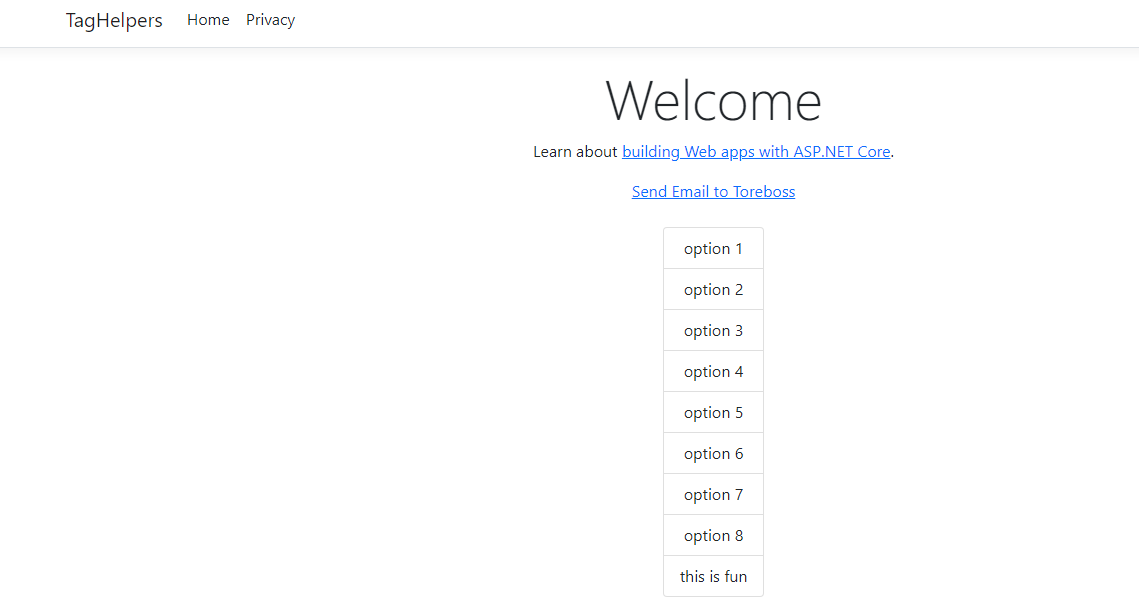
<list separator="|">option 1| option 2| option 3| option 4| option 5| option 6| option 7| option 8|this is fun<list>
We want to turn that HTML into the list shown in screen shot below :
That is - create a list using an <ul> tag followed by <li> tags inside. Since we need to access the inner content of the HTML here, we have to use ProcessAsync method of derived method from the TagHelper. We create a TagHelper by inheriting from this class and we also have to name the class suffixed by TagHelper by convention. The resulting Tag Helper then looks like this:


using System.Text;
using Microsoft.AspNetCore.Razor.TagHelpers;

namespace TagHelpers.TagHelpers;

public class ListTagHelper : TagHelper {

    public override async Task ProcessAsync(TagHelperContext context, TagHelperOutput output)
    {
        output.TagName = "ul";
        output.Attributes.Add("class", "list-group");
        output.Attributes.Add("style", "display:inline-block"); 
        var existingContent = await output.GetChildContentAsync(); 
        var allContent = existingContent.GetContent();
        var items = allContent.Trim().Split(new[] { Separator }, StringSplitOptions.None);
        var outputHtml = new StringBuilder();
        foreach (var item in items){
            outputHtml.Append($@"<li class=""list-group-item"">{item}</li>");
        }
        output.Content.SetHtmlContent(outputHtml.ToString());        
    }
    public string Separator { get; set; } = ",";
}


We default set the property Separator default to "," to separate items in our list. We could use another separator, such as "|" shown in the markup. If you omit the Separator, "," will be default used. Each public property becomes a recognized attribute in your TagHelper and can be used in the HTML. The TagName is the tag that will be used in the HTML. As we see, we also add 'class' and 'style' attributes here to show a list-group in HTML using Bootstrap 5 classes. We also split the items using the separator, make not that we use the GetChildContentAsync() method on the TagHelperOutput output object, followed by GetContent() method call. Also note that we have to use SetHtmlContent method in case we want to add explicit html content in the content of our 'a' tag here. It is suggested that you stick to string properties in Razor tag helpers instead of other data types.

Monday, 3 April 2023

Using Azure Cognitive Services to summarize articles

I have added a repo on Github for a web scraping app written in .NET MAUI Blazor. It uses Azure Cognitive Services to summarize articles. https://github.com/toreaurstadboss/DagbladetWebscrapper The web scrapper uses the Nuget package for Html agility pack to handle the DOM after downloading articles from the Internet. As the name of the repo suggests, it can be used to read for example Dagbladet articles, without having to waddle through ads. 'Website Scraping' is a term that means extracting data from web sites, or content in general. The following libraries are used in the Razor lib containing the text handling methods to scrap web pages:

<PackageReference Include="Azure.AI.TextAnalytics" Version="5.3.0" />
<PackageReference Include="HtmlAgilityPack" Version="1.11.52" />
<PackageReference Include="Microsoft.AspNetCore.Components.Web" Version="6.0.19" />
Let's first look at the SummarizationUtil class. This uses TextAnalyticsClient in Azure.AI.TextAnalytics. We will summarize articles into five sentence summaries using the
Azure AI text analytics client.


using Azure.AI.TextAnalytics;
using System.Text;

namespace Webscrapper.Lib
{
	public class SummarizationUtil : ISummarizationUtil
	{

		public async Task<List<ExtractiveSummarizeResult>> GetExtractiveSummarizeResult(string document, TextAnalyticsClient client)
		{
			var batchedDocuments = new List<string>
			{
				document
			};
			var result = new List<ExtractiveSummarizeResult>();
			var options = new ExtractiveSummarizeOptions
			{
				 MaxSentenceCount = 5
			};
			var operation = await client.ExtractiveSummarizeAsync(Azure.WaitUntil.Completed, batchedDocuments, options: options);
			await foreach (ExtractiveSummarizeResultCollection documentsInPage in operation.Value)
			{
				foreach (ExtractiveSummarizeResult documentResult in documentsInPage)
				{
					result.Add(documentResult);
				}
			}
			return result;
		}

		public async Task<string> GetExtractiveSummarizeSentectesResult(string document, TextAnalyticsClient client)
		{
			List<ExtractiveSummarizeResult> summaries = await GetExtractiveSummarizeResult(document, client);
			return string.Join(Environment.NewLine, summaries.Select(s => s.Sentences).SelectMany(x => x).Select(x => x.Text));
		}

	}

}

We set up the extraction here to return a maximum of five sentences. Note the use of await foreach here. (async ienumerable) Here is a helper method to get a string from a ExtractiveSummarizeResult.

using Azure.AI.TextAnalytics;
using System.Text;

namespace Webscrapper.Lib
{

	public static class SummarizationExtensions
	{

		public static string GetExtractiveSummarizeResultInfo(this ExtractiveSummarizeResult documentResults)
		{
			var sb = new StringBuilder();

			if (documentResults.HasError)
			{
				sb.AppendLine($"Error!");
				sb.AppendLine($"Document error code: {documentResults.Error.ErrorCode}.");
				sb.AppendLine($"Message: {documentResults.Error.Message}");
			}
			else
			{
				sb.AppendLine($"SUCCESS. There are no errors encountered while summarizing the document");
			}

			sb.AppendLine($"Extracted the following {documentResults.Sentences.Count} sentence(s):");
			sb.AppendLine();

			foreach (ExtractiveSummarySentence sentence in documentResults.Sentences)
			{
				sb.AppendLine($"Sentence: {sentence.Text} Offset: {sentence.Offset} Rankscore: {sentence.RankScore} Length:{sentence.Length}");
				sb.AppendLine();
			}
			return sb.ToString();
		}
	}

}


Here is a factory method to create a TextAnalyticsClient.


using Azure;
using Azure.AI.TextAnalytics;

namespace Webscrapper.Lib
{
    public static class TextAnalyticsClientFactory
    {

        public static TextAnalyticsClient CreateClient()
        {
            string? uri = Environment.GetEnvironmentVariable("AZURE_COGNITIVE_SERVICE_ENDPOINT", EnvironmentVariableTarget.Machine);
            string? key = Environment.GetEnvironmentVariable("AZURE_COGNITIVE_SERVICE_KEY", EnvironmentVariableTarget.Machine);
            if (uri == null)
            {
                throw new ArgumentNullException(nameof(uri), "Could not get system environment variable named 'AZURE_COGNITIVE_SERVICE_ENDPOINT' Set this variable first.");
            }
            if (uri == null)
            {
                throw new ArgumentNullException(nameof(uri), "Could not get system environment variable named 'AZURE_COGNITIVE_SERVICE_KEY' Set this variable first.");
            }
            var client = new TextAnalyticsClient(new Uri(uri!), new AzureKeyCredential(key!));
            return client;
        }

    }
}


To use Azure Cognitive Services, you have to get the endpoint (an url) and a service key for your account in Azure portal after having activated Azure Cognitive Services. The page extraction util looks like this, note the use of Html Agility pack.


using HtmlAgilityPack;
using System.Text;

namespace Webscrapper.Lib
{
	public class PageExtractionUtil : IPageExtractionUtil
	{

		public async Task<string?> ExtractHtml(string url, bool includeTags)
		{
			if (string.IsNullOrEmpty(url)) 
				return null;
			var httpClient = new HttpClient();

			string pageHtml = await httpClient.GetStringAsync(url);
			if (string.IsNullOrEmpty(pageHtml))
			{
				return null;
			}

			var htmlDoc = new HtmlDocument(); 
			htmlDoc.LoadHtml(pageHtml);
			var textNodes = htmlDoc.DocumentNode.SelectNodes("//h1|//h2|//h3|//h4|//h5|//h6|//p")
				.Where(n => !string.IsNullOrWhiteSpace(n.InnerText)).ToList();
			var sb = new StringBuilder();
			foreach (var textNode in textNodes)
			{
				var text = textNode.InnerText;
				if (includeTags)
				{
					sb.AppendLine($"<{textNode.Name}>{textNode.InnerText}</{textNode.Name}>");
				}
				else
				{
					sb.AppendLine($"{textNode.InnerText}");
				}
			}
			return sb.ToString();
		}
	}
}


Let's look at an example usage :

@page "/"
@inject ISummarizationUtil SummarizationUtil
@inject IPageExtractionUtil PageExtractionUtil

@using DagbladetWebscrapper.Models;

<h1>Dagbladet Artikkel Oppsummering</h1>

<EditForm Model="@Model" OnValidSubmit="@Submit" class="form-group">
    <DataAnnotationsValidator />
    <ValidationSummary />
  
    <div class="form-group row">
    <label for="Model.ArticleUrl">Url til artikkel</label>
    <InputText @bind-Value="Model!.ArticleUrl" placeholder="Skriv inn url til artikkel i Dagbladet" />
    </div>

    <div class="form-group row">
    <span>Artikkelens oppsummering</span>
    <InputTextArea readonly="readonly" placeholder="Her dukker opp artikkelens oppsummering" @bind-Value="Model!.SummarySentences" rows="5"></InputTextArea>
    </div>

    <div class="form-group row">
    <span>Artikkelens tekst</span>
    <InputTextArea readonly="readonly" placeholder="Her dukker opp teksten til artikkelen" @bind-Value="Model!.ArticleText" rows="5"></InputTextArea>
    </div>
    
    <button type="submit">Submit</button>


</EditForm>

@code {
    private Azure.AI.TextAnalytics.TextAnalyticsClient _client;

    public IndexModel Model { get; set; } = new();

    private async void Submit()
    {
        string articleText = await PageExtractionUtil.ExtractHtml(Model!.ArticleUrl, false);
        Model.ArticleText = articleText;
        if (_client == null)
        {
            _client = TextAnalyticsClientFactory.CreateClient();
        }
        string summaryText = await SummarizationUtil.GetExtractiveSummarizeSentectesResult(articleText, _client);
        Model.SummarySentences = summaryText;

        StateHasChanged();
    }   

}


The view model class for the form looks like this.


using System.ComponentModel.DataAnnotations;

namespace DagbladetWebscrapper.Models
{
	public class IndexModel
	{
        [Required]
        public string? ArticleUrl { get; set; }

        public string SummarySentences { get; set; }

        public string ArticleText { get; set; }
    }
}


Let's look at a screen shot that shows the app in use. It targets an article on the tabloid newspaper Dagbladet in Norway. This tabloid is notorious for writing sensational titles of articles so you have to click into the article (e.g. 'clickbait') and then inside the article, you have to wade through lots of ads. Here, you now have an app, where you can open up www.dagbladet.no and find a link to an article and now extract the text and get a five sentence summary using Azure AI Cognitive services in a .NET MAUI app.
Saturday, 4 March 2023

Generic math - Factorial method

Here is a example of a generic math factorial method in C# 11. Generic math allows you to make numeric methods that makes use of the INumber generic interface, which got many static virtual methods where you can make a numeric method that supports different kinds of number types, such as decimal, int, float and double. The code below calculates the factorial of some values in an array. We have inserted a double value here that shows that Factorial of a double or any number with decimal works a bit different than ints, as the decimal part takes part here. The factorial of 0! is defined as 1 and we multiply n with n-1 as long as n > 0. Note the use of T.One and T.Zero here, defined as
static virtual members of the different number types in C#.


void Main()
{
	var someNums = new[] { 1, 2, 3, 3.141592, 5};
	var fact = someNums.Select(n =>  Factorial(n));
	fact.Dump();
	
}

T Factorial<T>(T num)
where T : INumber<T>
{
	var result = T.One;
	while (num > T.Zero){
		result *= num;
		num--;
	}
	return result;
}


Output shows the result in Linqpad 7 after having specified using .NET 7:

Trøndersk dialekttemp with C# 11 og and patterns

This article demonstrates the use of relational patterns in C# 11. First off, relational patterns allow us to test how a given value /variable compares to constants. If we want to have multiple conditions we can use and operator not shown here. I have here different conditions / intervals for temperaturs outputting the temperature and description of the weather in some local language of mine from Norway (Trøndersk / Trondheim city).
	   
    
foreach (var iteration in Enumerable.Range(0, 20)){
    var tæmpen = new Random().Next(-60, 60);
    
    var været = $"Været e i dag {tæmpen}C og på Trondheimsdialækt: {tæmpen switch 
    {
        <= -50 => "Du træng eitt nytt termometer. For kaldt!",
        <= -35 => "Småfuggel'n dætt dau fra trær'n",
        <= -30 => "Båinnspeika",
        <= -25 => "Få inn katta!",
        <= -20 => "Gnallerfrost",
        <= -10 => "Kjøle kaaalt",
        <= -5  => "Kaillvoli",
        <= 5 => "Kaillhustri",
        <= 10 => "Julivær",
        <= 15 => "Godværsle",
        <= 20 => "Kjøle varmt",
        <= 25 => "Råådeili",
        <= 30 => "Steikvarmt",
        <= 40 => "Søkke heitt",
        <= 50 => "Kokheitt",
        _ => "Du træng eitt nytt termometer. For varmt!"
    }}";
    
    System.Console.WriteLine(været);
} 
    
    
As we can see, in C# 11, we can do a lot more inside string interpolation expressions and now allow multiple lines, including relational patterns. It can be quite handy to use, when .NET 7 and C# 11 reaches mainstream usage. The text here is based upon a dialect based thermometer, available for purchase from here: https://dialekttempen.no/butikk/termometer/fylker/sor-trondelag/trondheim-munkholmen/#&gid=1&pid=1

Monday, 20 February 2023

Running eclint locally in development environment

If you have come accross eclint in Azure Devops or in other scenarios, you might want to run this in local development instead to get your linting return an error, possible crashing the build pipeline in Azure Devops. Eclints checks the .editorconfig file of your VS solution and reports if your code is badly formatted according to this file code style rules. Here is a typical eclint setup written with YAML
 
 # Runs ECLINT CHECK. This verfies that code conforms to editor config file.
parameters:
  lintingResultArtifactName: 'LINTING' # Name of published artifact with results.

steps:
- task: Bash@3
  displayName: 'Template steps-linting'
  inputs:
    targetType: 'inline'
    script: 'echo Template steps linting'
- task: Bash@3
  displayName: 'Install ECLINT'
  inputs:
    targetType: 'inline'
    script: |
        sudo npm install -g eclint
    failOnStderr: false
- task: Bash@3
  displayName: 'ECLINT check'
  inputs:
    targetType: 'inline'
    script: |
      eclint check $(git ls-files -- . ':!:*.sln' . ':!:*.sln.DotSettings') > $(Build.ArtifactStagingDirectory)/eclint.txt 2>&1
      file=$(Build.ArtifactStagingDirectory)/eclint.txt
      if [ -s "$file" ]
      then
        echo " ECLint reported errors - build failed 😔" 1>&2
        cat $file
        exit 1
      else
        echo " No errors found. You did good 👍 "
        exit 0
      fi
    failOnStderr: false
- task: PublishBuildArtifacts@1
  displayName: 'Publish artifact'
  condition: succeededOrFailed()
  inputs:
    PathtoPublish: '$(Build.ArtifactStagingDirectory)'
    ArtifactName: ${{ parameters.lintingResultArtifactName }}
    publishLocation: 'Container'


The following shell script can be run with Git Bash in for example Windows environments to run eclint locally.
 
 #!/bin/bash

GREEN='\033[0;32m'
RED='\033[0;31m'
NC='\033[0m' # No Color

exists() {
    command -v "$1" > /dev/null 2>&1
}

runEcLint(){
    echo -e "Starting up eclint linting the files of the solution! ${GREEN}[SUCCESS]${NC} Current folder:"
    pwd
    eclint check $(git ls-files -- . ':!:*.sln' . ':!:*.sln.DotSettings') > eclint.txt 2>&1
    file=eclint.txt
    if [ -s "$file" ]
    then
        echo " ECLint reported errors - build failed 😔" 1>&2
        cat $file
        echo -e "ECLint command reported a ${RED}[FAIL]${NC}. Correct the errors."
        rm eclint.txt
        exit 1
    else
        echo " No errors found. You did good 👍 "
        echo -e "ECLint command reported a ${GREEN}][SUCCESS]${NC}"
        rm eclint.txt
        exit 0
    fi
}

echo "Running eclint locally to check the solution. Checking LOCALDEV environment.."

echo "Checking that npm is installed globally.. "
if  ! [[ "exists npm" ]]; then
    echo -e "Npm is not installed globally. ${RED} [FAIL]${NC}"
    echo "Install npm globally first before running this script! See: https://nodejs.org/en/download/"
    echo "Recommended next step: Install LTS of jnodejs together with npm"
    exit 1
else
    echo -e "You have already installed npm (globally). ${GREEN} [SUCCESS]${NC}"
fi

echo "Checking that eclint is installed globally.. "
if  !  [[ "exists eclint" ]]; then
    echo -e "eclint is not installed globally. ${RED} [FAIL]${NC}"
    echo "Make sure you run this script with sufficient access : Attempting to install eclint globally next."
    echo "Trying to run this command to install eclint: npm install eclint -g"
    npm install -g eclint
    echo -e "\neclint should now be installed. Continuing! ${GREEN} [SUCCESS]${NC}"
else
    echo -e "You have already installed eclint (globally). ${GREEN} [SUCCESS]${NC}"
fi

echo "Switching up a folder to run at root folder of the source.."
pushd ..
echo -e "Switched to parent folder ${GREEN}[SUCCESS]${NC}"

runEcLint

popd #back to the eclint folder
  
 
In case you are running WSL, chances are that you must check if a command is available like this: if ! [ -x "$(command -v npm)" ]; then Also, you might need to add 'sudo' before the npm install -g command. The following launch.json file shows how you can debug inside VsCode Bash scripts, using extension Bash Debug for VsCode.
 
 {
    // Use IntelliSense to learn about possible attributes.
    // Hover to view descriptions of existing attributes.
    // For more information, visit: https://go.microsoft.com/fwlink/?linkid=830387
    "version": "0.2.0",
    "configurations": [
        {
            "type": "bashdb",
            "request": "launch",
            "name": "Bash-Debug",
            "cwd": "${workspaceFolder}",
            "program": "${file}",
            "args": []
            }
    ]
}
 
I tested the script against a solution at work and it spotted the intended eclint warnings for multiple files, as a proof of concept. This makes it easier to fix up eclint errors before pushing them to Azure Devops !

Sunday, 5 February 2023

Calculating the weeks difference in C#

This short article will present a method to calculate a WeekDiff method in C#. We could first just look at the TimeSpan and divide by seven to get the amount of whole weeks two dates differs. Lets first implement it like this :
 
 
         /// <summary>
        /// Calculates the number of weeks between <paramref name="fromDate"/> and <paramref name="toDate"/>.
        /// Also, the remainder days are looked upon and calculation will also see if weeks are different by adding fromDate with the remainding days
        /// (i.e. the difference in total days minus N full weeks.
        /// The weeks ago is the number of 'full weeks' plus an extra week if there are more days and the week numbers
        /// are different between fromDate and fromDate+remainding days giving in some calculation N+1 weeks ago if the week numbers are different by adding the remainder.
        /// </summary>
        /// <param name="fromDate">The from date to calculate the number of weeks diff</param>
        /// <param name="toDate">The to date to calculate the number of weeks diff</param>
        /// <param name="startOfWeek">Start of week (DayOfWeek). Default will be Monday. For english culture, use Sunday.</param>
        /// <param name="currentCulture">Specify culture, this will in turn use the Calendar of the culture for calculation. Fallbacks to CurrentCulture if not specified.</param>
        /// <returns></returns>
        public static int CalcWeekDiff(this DateTime fromDate, DateTime toDate)
        {
            if (fromDate > toDate)
            {
                var temp = fromDate;
                fromDate = toDate;
                toDate = temp;
            }
            if (currentCulture == null)
            {
                currentCulture = CultureInfo.CurrentCulture;
            }
            TimeSpan diff = toDate.Subtract(fromDate);
            int weeks = diff.Days / 7;           
            return weeks;
        } 
 
But we could also look at the remainder part and include it also. Maybe two dates differs in 10 days, that is more than one week. If we qualify this as 'two weeks' we get:
 
 
        /// <summary>
        /// Calculates the number of weeks between <paramref name="fromDate"/> and <paramref name="toDate"/>.
        /// Also, the remainder days are looked upon and calculation will also see if weeks are different by adding fromDate with the remainding days
        /// (i.e. the difference in total days minus N full weeks.
        /// The weeks ago is the number of 'full weeks' plus an extra week if there are more days and the week numbers
        /// are different between fromDate and fromDate+remainding days giving in some calculation N+1 weeks ago if the week numbers are different by adding the remainder.
        /// </summary>
        /// <param name="fromDate">The from date to calculate the number of weeks diff</param>
        /// <param name="toDate">The to date to calculate the number of weeks diff</param>
        /// <param name="startOfWeek">Start of week (DayOfWeek). Default will be Monday. For english culture, use Sunday.</param>
        /// <param name="currentCulture">Specify culture, this will in turn use the Calendar of the culture for calculation. Fallbacks to CurrentCulture if not specified.</param>
        /// <returns></returns>
        public static int CalcWeeksDiff(this DateTime fromDate, DateTime toDate)
        {
            if (fromDate > toDate)
            {
                var temp = fromDate;
                fromDate = toDate;
                toDate = temp;
            }
            if (currentCulture == null)
            {
                currentCulture = CultureInfo.CurrentCulture;
            }
            TimeSpan diff = toDate.Subtract(fromDate);
            int weeks = diff.Days / 7;
            int remainingDays = diff.Days % 7;           
        }

 
We might also look more into looking at the week number of the dates. Then we must also consider CultureInfo and CalendarWeekRule - lets choose FirstFullWeek and what is the start of week in the calender which differs also from country to country. If we judge two dates then then to have different week numbers by adding the remainder part (i.e. diff.Days % 7) to give different week numbers, we add +1 to the final result. This should then work in special cases, such as years having 52 and 53 weeks around New Year. The weeks diff calculation then looks like this:
 
 
         /// <summary>
        /// Calculates the number of weeks between <paramref name="fromDate"/> and <paramref name="toDate"/>.
        /// Also, the remainder days are looked upon and calculation will also see if weeks are different by adding fromDate with the remainding days
        /// (i.e. the difference in total days minus N full weeks.
        /// The weeks ago is the number of 'full weeks' plus an extra week if there are more days and the week numbers
        /// are different between fromDate and fromDate+remainding days giving in some calculation N+1 weeks ago if the week numbers are different by adding the remainder.
        /// </summary>
        /// <param name="fromDate">The from date to calculate the number of weeks diff</param>
        /// <param name="toDate">The to date to calculate the number of weeks diff</param>
        /// <param name="startOfWeek">Start of week (DayOfWeek). Default will be Monday. For english culture, use Sunday.</param>
        /// <param name="currentCulture">Specify culture, this will in turn use the Calendar of the culture for calculation. Fallbacks to CurrentCulture if not specified.</param>
        /// <returns></returns>
        public static int CalcWeeksDiff(this DateTime fromDate, DateTime toDate, DayOfWeek startOfWeek = DayOfWeek.Monday, CultureInfo currentCulture = null)
        {
            if (fromDate > toDate)
            {
                var temp = fromDate;
                fromDate = toDate;
                toDate = temp;
            }
            if (currentCulture == null)
            {
                currentCulture = CultureInfo.CurrentCulture;
            }
            TimeSpan diff = toDate.Subtract(fromDate);
            int weeks = diff.Days / 7;
            int remainingDays = diff.Days % 7;
            var cal = currentCulture.Calendar;
            var fromDateWeekNo = cal.GetWeekOfYear(fromDate, CalendarWeekRule.FirstFullWeek, startOfWeek);
            var fromDateWeekNoPlusRemDays = cal.GetWeekOfYear(fromDate.AddDays(remainingDays), CalendarWeekRule.FirstFullWeek, startOfWeek);

            if (fromDateWeekNo != fromDateWeekNoPlusRemDays)
            {
                weeks++; //if week numbers are different, count +1 weeks (i.e. week diff does not have to be N 'full weeks', only that week numbers are different)
            }
            return weeks;
        }
 
 
Then we can check if for example 28th of December 2022 and 2nd of January 2023 are one week between and they are.
 
 	var from = new DateTime(2022, 12, 28); 
	var to = new DateTime(2023, 1, 2); 
	var weeksDiff = from.CalcWeeksDiff(to);
	weeksDiff.Dump("# of Weeks ago"); //Linqpad util method
 
So calculating weeks diff could take different approaches :
  • Number of weeks differing meaning integral part of weeks : just do a TimeSpan (swap if to is before from date) and divide by 7
  • Include considering if we have more than a integral part of weeks : consider also the remainder part - if remainder gives modulo % 7 > 0 we add +1 to the result
  • We have seen that we should include more checking of the remainder part to consider if two dates have different week numbers. Then also include CalendarWeek rules, CultureInfo and DayOfWeek

Friday, 3 February 2023

Looking into a stacktrace to find a given method name

When you log exceptions, it is sometimes interesting to look after a method name in the stackTrace (the 'callstack' where the application or system is running) An example usage of helper method I wrote to find the StackFrame containing the method of name to search is shown below.
 
     StackFrameExtensions.MethodStackFrameInfo methodStackFrame = stackTrace.FindStackFrameWithMethod("service", 2, nameof(OnEntry).ToLower(), nameof(LogUnauthorizedAccessDetails).ToLower());
 
This specifies that we want to look in the stack trace after a method which is containing 'service' (case insensitive), with a given minimum frame count of at least 2 from the place you retrieve the stackTrace and ignoring the method name "OnEntry" if it is found (Case insensitive). I have used this inside Postsharp aspects. It can be helpful in code where you either use AOP or some code where you expect a method call exist with a method name containing some string with a given distance (frame count) from the location in code you retrieve the stack frames. Note that you can always obtain a StackTrace by just instantiating a new StackTrace, e.g :
 
  var stackTrace = new StackTrace(); 
 
The stack trace helper extension method then looks like this:
 
 using System;
using System.Collections.Generic;
using System.Diagnostics;
using System.Linq;
using System.Reflection;

namespace DebuggingExtensionsLib
{
    public static class StackFrameExtensions
    {
        /// <summary>
        /// Retrieves the first stack frame of interest matching having a method with a name containing the <paramref name="methodNameContaining"/>. Case-insensitive search.
        /// </summary>
        /// <param name="stackTrace"></param>
        /// <param name="methodNameContaining">Pass in the method name to search for (case insensitive match)</param>
        /// <param name="minimumFrameCount">The minimum stack frame count. Defaults to 2.</param>
        /// <param name="ignoreMethodNamesContaining">Pass in one or more method names to ignore</param>
        /// <returns></returns>
        public static MethodStackFrameInfo FindStackFrameWithMethod(this StackTrace stackTrace, string methodNameContaining, int minimumFrameCount = 2, params string[] ignoreMethodNamesContaining)
        {
            try
            {
                var stackFrames = stackTrace.GetFrames();

                if (stackFrames == null || stackFrames.Length < minimumFrameCount)
                {
                    return null;
                }

                for (int i = 0; i < stackFrames.Length; i++)
                {
                    MethodBase mi = stackFrames[i].GetMethod();
                    if (mi.ReflectedType == null)
                    {
                        continue;
                    }
                    if (ignoreMethodNamesContaining != null && ignoreMethodNamesContaining.Any())
                    {
                        if (ignoreMethodNamesContaining.Contains(mi.Name, StringComparer.CurrentCultureIgnoreCase))
                        {
                            continue;
                        }
                    }
                    // Looks like the parameter value is not possible to obtain
                    string fullMethodName = $"{mi.ReflectedType.Name}.{mi.Name}";

                    if (!fullMethodName.Contains(methodNameContaining, StringComparison.CurrentCultureIgnoreCase))
                    {
                        continue;
                    }
                   
                    var parameterDictionary = mi.GetParameters().Select(mp => new
                    {
                        ParameterName = mp.Name,
                        ParameterType = mp.ParameterType.Name
                    }).ToDictionary(x => x.ParameterName, x => x.ParameterType);

                    var stackFrameInfo = new MethodStackFrameInfo
                    {
                        MethodName = fullMethodName,
                        MethodParameters = parameterDictionary
                    };
                    return stackFrameInfo;
                }

                return null;
            }
            catch (Exception err)
            {
                Debug.WriteLine(err);
                return null;
            }
        }

        public class MethodStackFrameInfo
        {
            public string MethodName { get; set; }

            public Dictionary<string, string> MethodParameters { get; set; } = new Dictionary<string, string>();

            public override string ToString()
            {
                return $"{MethodName}({string.Join(",", MethodParameters.Select(x => x.Value + " " + x.Key).ToArray())})";
            }
        }
    }
}
 
We return here an instance of MethodStackFrameInfo, where we get the method name and also the parameters given into the method with the value and the key, this means in this context the data type and the parameter name given as method parameter. It will return text like SomeClass.SomeMethod(Int32 somearg1, System.String somearg2). Hence you can log this information in a logger to understand which method was called, up the stack with a known name. This can be practical also in systems where you have some wrapping code and the code you want to inspect if was called is some stack frames up the stack.

Monday, 23 January 2023

Creating a json string representing enum names and values in C#

A short blog post here demonstrating how to create a JSON string showing enum names and values for an enum in C#, simple stuff! From Linqpad 7:

void Main()
{
	var jsonEnum = EnumUtil.GenerateJsonForEnum<PasientOvertattEnum>();
	jsonEnum.Dump();	
}

public static class EnumUtil
{

	/// <summary>
	/// Generates a json string (array) for enum values
	/// Checked that it gives valid json array string here : https://jsonlint.com/
	/// </summary>
	public static string GenerateJsonForEnum<TEnum>()
	 where TEnum : struct, IConvertible
	{
		var enumItems = new List<object>();
		var sb = new StringBuilder();
		sb.AppendLine("[\n");
		bool isEnumValueFound = false;
		foreach (var enumValue in Enum.GetValues(typeof(TEnum)))
		{
			sb.AppendLine($@"	{{	""Name"": ""{enumValue}"", ""Value"": ""{(int)enumValue}""	}},");
			isEnumValueFound = true;
		}
		if (isEnumValueFound)
		{
			sb.Remove(sb.Length - 3, 1);
		}
		sb.AppendLine("\t]");
		return sb.ToString();
	}
}


This gives the following sample json string when testing:


[

  {  "Name": "Velgverdi", "Value": "0"  },
  {  "Name": "AkershusUniversitetssykehusHF", "Value": "1"  },
  {  "Name": "DiakonhjemmetSykehusAS", "Value": "2"  },
  {  "Name": "FinnmarkssykehusetHF", "Value": "3"  },
  {  "Name": "HaraldsplassDiakonaleSykehusAS", "Value": "4"  },
  {  "Name": "HelgelandssykehusetHF", "Value": "5"  },
  {  "Name": "HelseBergenHF", "Value": "6"  },
  {  "Name": "HelseFonnaHF", "Value": "7"  },
  {  "Name": "HelseFordeHF", "Value": "8"  },
  {  "Name": "HelseMoreogRomsdalHF", "Value": "9"  },
  {  "Name": "HelseNordTrondelagHF", "Value": "10"  },
  {  "Name": "HelseStavangerHF", "Value": "11"  },
  {  "Name": "LovisenbergDiakonaleSykehusAS", "Value": "12"  },
  {  "Name": "NordlandssykehusetHF", "Value": "13"  },
  {  "Name": "OsloUniversitetssykehusHF", "Value": "14"  },
  {  "Name": "SandvikaNevrosenter", "Value": "15"  },
  {  "Name": "StOlavshospitalHF", "Value": "16"  },
  {  "Name": "SykehusetiVestfoldHF", "Value": "17"  },
  {  "Name": "SykehusetInnlandetHF", "Value": "18"  },
  {  "Name": "SykehusetTelemarkHF", "Value": "19"  },
  {  "Name": "SykehusetOstfoldHF", "Value": "20"  },
  {  "Name": "SorlandetsykehusHF", "Value": "21"  },
  {  "Name": "UniversitetssykehusetNordNorgeHF", "Value": "22"  },
  {  "Name": "VestreVikenHF", "Value": "23"  },
  {  "Name": "Utenlands", "Value": "24"  },
  {  "Name": "Ukjent", "Value": "25"  }
  ]


The JSON string above has been tested and validated okay against : https://jsonlint.com/ So if you need to show the data contents of an enum into a Json, this is a simple way of doing this.

Saturday, 7 January 2023

List patterns in C# 11 - And getting a compiler error on code that should work

I have tested out list patterns in .NET 7 and C#. I am using Linqpad 7 and .NET 7.0.1. List patterns are useful I guess to compared sequences and fun to test out. The '_' discard here means to ignore the number at a given position and the '..' range here is to match anything between a given set of value and one index and then a given value at a higher index with arbitrary values between. But in one of the samples, it says you can capture variables inside list patterns. I cannot make it work, I get a compiler error. I am getting a CS0165 'Use of unassigned local variable' error when I try to access the variable(s) captured. I tried checking the crashing code also inside VsCode, still getting the error, however if I debug inside Linqpad I can see the variables that are captured got values at least.

    var someOddNumbers = new int[] { 1, 3, 5, 7, 9, 11 };
    bool resultX = someOddNumbers is [1, 3, _, _, _, 11];
    resultX.Dump("The 'someOddNumbers' equals a sequence of numbers 1,3,then three arbitrary numbers, then 11?");

    bool isOdd = someOddNumbers is [1, .., 9, 11];
    isOdd.Dump("The 'someOddNumbers' equals a sequence of numbers 1, some arbitrary numbers, then ending with 9 and 11?");
    
    result = input is [var firstOddNumber,.. var lastOddNumber];

    if (result)
    {
        Console.WriteLine($"The captured variables are: {firstOddNumber} and {lastOddNumber}"); //this lines gives the CS0165 error
    }

If I comment out the if block I can run the code sample, and in the debugger I can see firstOddNumber and lastOddNumber being set to a value at runtime. But the C# 11 compiler seems to think this is illeagal code since it is using an unintialized variable. I expected to not get a compiler error and be able to also capture the variables defined in the list pattern. I cannot understand the usage of such variables if I cannot use them. I understand that these variables might not be captured if the list pattern does not match, but even when checking if a match was present, I got the compilation error. I can however run the code, just not access the variables.

Sunday, 11 December 2022

Presentation in Norwegian presenting demo repository with GraphQL and Hotchocolate/Strawberryshake

I have written a presentation about GraphQL demo repository of mine here. It is in Norwegian, so it will not be translated to english here. For Norwegian readers : Jeg har skrevet en presentasjon på norsk om GraphQL som går igjennom et demo repository som benytter GraphQL, med HotChocolate i backend, sammen med Entity Framework Core 6 og .net 6 (C# selvsagt) og som i frontend benytter Blazor og StrawberryShake ! Dere kan lese de 43 slidesene vedlagt OneDrive lenken under. I foredraget går jeg igjennom key giveaways om GraphQL, inkludert case insensitive søk, omtale om paginerte data og projisering og gir et overblikk av hva GraphQL går ut på og hvilke fordeler man kan få ut av det. Sentrale fordeler med GraphQL er : * Fleksibilitet - spesifiser hvilke felter du vil ha for å unngå "overfetching" * -Ytelse - færre API kall og unngår waterfall opphenting hvor man må hente opp stadig flere ressurser som i fra et REST API, men får en aggreggert tilpasset struktur av de data man faktisk vil ha tilbake * Ett felles endepunkt /graphql - man slipper å lage controllere som i REST API - som ofte føles som unødvendig. GraphQL er ikke noe som kan løse alle utfordringer i API design, men det kan gi klienter mye mer fleksibilitet og også unngå at API designere må stadig lage flere metoder og som har både "overfetching" eller enda verre - underfetching - som gir flere API kall og dårligere ytelse. Man utnytter båndbredde og serverressurser bedre ved å kun hente ut informasjon man trenger. Og GraphQL er ikke bare orientert rundt spørringer, men også endringer (mutations), pub sub event pattern (Subscriptions) og en hel del annen funksjonalitet som tilhører API design ! Du kan lese Powerpoint presentasjonen her (43 slides, lesetid ca 1 time om du vil studere det nøye, en 15 minutt om du vil skumlese mer). #blazor #hotchocolate #strawberryshake #chillicream #apidesign #csharp #dotnet #codinggrounds The presentation is here :

Powerpoint presentation (Norwegian, 11th december 2022) : https://1drv.ms/u/s!AhGGDxs-tzqJcFrls6Fue8Xnjx4?e=lWYYwU

Friday, 18 November 2022

Case insensitive search in HotChocolate GraphQL

I tested out the contains operator on string fields today in GraphQL. It is actually case sensitive, and this is counter-intuitive since I have connected the GraphQL database to a SQL database, which performs usually a case insensitive search with the 'contains' operator (using 'LIKE' operator
under the hood). The following adjustments need to be made to make it work : First off, define a class inheriting QueryableStringOperationHandler
 

using HotChocolate.Data.Filters;
using HotChocolate.Data.Filters.Expressions;
using HotChocolate.Language;
using System.Linq.Expressions;
using System.Reflection;

namespace AspNetGraphQLDemoV2.Server
{
    public class QueryableStringInvariantContainsHandler : QueryableStringOperationHandler
    {
        private static readonly MethodInfo _contains = typeof(string).GetMethod(nameof(string.Contains), new[] { typeof(string) })!;

        public QueryableStringInvariantContainsHandler(InputParser inputParser) : base(inputParser)
        {
        }

        protected override int Operation => DefaultFilterOperations.Contains;
        public override Expression HandleOperation(QueryableFilterContext context, IFilterOperationField field, 
            IValueNode value, object? parsedValue)
        {
            Expression property = context.GetInstance();
            if (parsedValue is string str)
            {
                var toLower = Expression.Call(property, typeof(string).GetMethod("ToLower", Type.EmptyTypes)!); //get the ToLower method of string class via reflection. The Type.EmptyTypes will retrieve the method overload of ToLower which accept no arguments.
                var finalExpression = Expression.Call(toLower, _contains, Expression.Constant(str.ToLower()));
                return finalExpression;

            }
            throw new InvalidOperationException();
        }
    }
}

 
We overload the Operation to 'Contains' so we are going to adjust how we treat the expression tree of GraphQL, overriding the HandleOperation. This is similar to the QueryableStringOperationHandler presented here: https://chillicream.com/docs/hotchocolate/api-reference/extending-filtering, in our case we support the contains method instead. The finalExpression 'DebugView' evaluates to :
.Call (.Call ($_s0.OfficialName).ToLower()).Contains("tind") To actually use this adaption of filtering of string properties in HotChocolate, we do the following in program.cs (startup class in .net 6) to not only add filtering support to HotChocolate, but also add a filter convention extension first to make it easier to register and avoid adding cluttering to the startup code in program.cs :

 
 using HotChocolate.Data.Filters;
using HotChocolate.Data.Filters.Expressions;

namespace AspNetGraphQLDemoV2.Server
{
    public class FilterConventionExtensionForInvariantContainsStrings : FilterConventionExtension
    {
        protected override void Configure(IFilterConventionDescriptor descriptor)
        {
            descriptor.AddProviderExtension(new QueryableFilterProviderExtension(
                                    y => y.AddFieldHandler<QueryableStringInvariantContainsHandler>()));
        }    
    }
}

 
You can see an example how I register this case insensitive contains filter in the program.cs example code below. Note both the usage of .AddFiltering() and the .AddConvention() call.
 
 
var builder = WebApplication.CreateBuilder(args);
var connectionString = builder.Configuration.GetConnectionString("MountainsV2Db");
builder.Services
    .AddDbContext<MountainDbContext>(options =>
    {
        options.UseSqlServer(connectionString);
    })
    .AddCors()
    .AddGraphQLServer()
    .AddProjections()
    .AddFiltering()
    .AddConvention<IFilterConvention, FilterConventionExtensionForInvariantContainsStrings>()
    .AddSorting()
    .RegisterDbContext<MountainDbContext>()
    .AddQueryType<MountainQueries>()
    .AddMutationType<MountainMutations>()
    .AddSubscriptionType<MountainSubscriptions>()
    .AddInMemorySubscriptions();

var app = builder.Build();
 
Now, sample .graphql file (containing a GraphQL query) that shows how the new filtering capability can be used :
 
 query {
  mountains (where: { officialName: {contains: "TiND"}}) {
    officialName
  }
}
 
The backend code retrieves a list of data from a table and I have added the [UseFiltering] attribute to specify for HotChocolate that filtering should be supported to the method.
 
   public class MountainQueries
    {
        [UseFiltering]
        [UseSorting]
        public async Task<List<Mountain>> GetMountains([Service] MountainDbContext mountainDb)
        {
            return await mountainDb.Mountains.ToListAsync();
        }

//..

Sunday, 4 September 2022

Faster expansion of databases in Sql Server Management Studio

I have observed a slow expansion of databases tree in Sql Server Management Studio. This can actually be fixed on many Sql Server instances by running this T-SQL :
 
EXECUTE sp_MSforeachdb
'
IF (''?'' NOT IN (''master'', ''tempdb'', ''msdb'', ''model''))
   EXECUTE (''ALTER DATABASE [?] SET AUTO_CLOSE OFF WITH NO_WAIT'')'


Now, this does not look that much similar to SQL, since it is T-SQL. But it will execute to disable auto_close for every database on your database server (that is, 'instance') and this will make expanding databases in your database tree fast again in SSMS ! This is a variant of what Pinal Dave mentions here, I just made an iterative variant of what he suggests : https://blog.sqlauthority.com/2016/09/22/sql-server-set-auto_close-database-option-off-better-performance/

Saturday, 27 August 2022

DynamicObject : Thread safety and anonymous type initialization

This article will present code that shows how we can create a custom dynamic object and control its behavior, supporting thread safety when setting and getting members and allowing anonymous type initialization. The code is available in this GitHub repo : git clone https://github.com/toreaurstadboss/DynamicObjectThreadSafe.git The custom dynamic object inherits from the class DynamicObject and uses a thread safe dictionary.
 
 
 using System;
using System.Collections;
using System.Collections.Concurrent;
using System.Collections.Generic;
using System.Dynamic;
using System.Linq;
using System.Reflection;
using System.Text.Json;
using System.Text.Json.Serialization;

namespace DynamicObjectThreadSafe
{
	public class ThreadSafeDynamicObject : DynamicObject, IEnumerable<KeyValuePair<string, object>>
	{

		public ThreadSafeDynamicObject()
		{
		}

		public ThreadSafeDynamicObject(dynamic members)
		{
			dynamic membersDict = ToDictionary(members);
			InitMembers(membersDict);
		}

		private IDictionary<string, object> ToDictionary(object data)
		{
			var attr = BindingFlags.Public | BindingFlags.Instance;
			var dict = new Dictionary<string, object>();
			foreach (var property in data.GetType().GetProperties(attr))
			{
				if (property.CanRead)
				{
					dict.Add(property.Name, property.GetValue(data, null));
				}
			}
			return dict;
		}

		private void InitMembers(IDictionary<string, object> membersDict)
		{
			foreach (KeyValuePair<string, object> member in membersDict)
			{
				_members.AddOrUpdate(member.Key, member.Value, (key, oldValue) => member.Value);
			}
		}

		private readonly ConcurrentDictionary<string, object> _members = new ConcurrentDictionary<string, object>();

		public override bool TryGetMember(GetMemberBinder binder, out object result)
		{
			return _members.TryGetValue(binder.Name, out result);
		}

		public override bool TrySetMember(SetMemberBinder binder, object value)
		{
			_members.AddOrUpdate(binder.Name, value, (key, oldvalue) => value);
			return true;
		}

		public override IEnumerable<string> GetDynamicMemberNames()
		{
			return _members.Keys.ToList().AsReadOnly();
		}

		public override string ToString()
		{
			return JsonSerializer.Serialize(_members);
		}

		public IEnumerator<KeyValuePair<string, object>> GetEnumerator()
		{
			return _members.GetEnumerator();
		}

		IEnumerator IEnumerable.GetEnumerator()
		{
			return _members.GetEnumerator();
		}
	}

}
 
 
The method ToDictionary transforms an input object, for example an anonymous class object via boxing (by accepting an object as parameter and implicitly 'boxing' it as a object) and the InitMember method will then populate the ConcurrentDictionary<string,object> object. This will allow us to pass anonymous objects and cast the object into a dynamic object, for further consumption. For example outputting fields of it. Now why would you use dynamic objects like this would you say? Dynamic objects are practical in many situations where you do not know the type until runtime. Many imlpementations of custom dynamic objects use Dictionary as a 'backing store' for the fields/properties/members of the object. This implementation uses ConcurrentDictionary and there should be thread safe concerning retrieving or setting members as shown in the overrides of methods TryGetMember and TrySetMember. The override for method GetDynamicMemberNames is for showing members in the debugger in the 'Dynamic view' to inspect the dynamic object properly. The GetEnumerator method overrides are to support casting the dynamic object to IDictionary<string,object> The following tests is then passing :
 
 
        [Fact]
        public void It_Can_Accept_Anonymous_Type_initialization()
        {
			dynamic threadSafeToyota = new ThreadSafeDynamicObject(new
			{
				Make = "Toyota",
				Model = "CR-H",
				Propulsion = new
				{
					IsHybrid = true,
					UsesPetrol = true,
					ElectricMotor = true
				}
			});

			Assert.Equal("Toyota", threadSafeToyota.Make);
			Assert.Equal("CR-H", threadSafeToyota.Model);
			Assert.Equal(true, threadSafeToyota.Propulsion.IsHybrid);
			Assert.Equal(true, threadSafeToyota.Propulsion.UsesPetrol);
			Assert.Equal(true, threadSafeToyota.Propulsion.ElectricMotor);
		}
 
 
And since this object is dynamic, we can extend it and adjust its members as dynamic allows you and as you can see we both can instantiate the dynamic object via anonymous type instance or populating it manually one property at a time. And doing so in a thread-safe many, for better support in multithreaded environments which are to expected many places today.