Saturday, 10 October 2020

Eslint Standalone in Azure Devops Build task

I have created a standalone tool that can run Eslint from the commandline. The tool is a Node.js application build with Pkg as a node10-win application, built as a standalone EXE file executable. You can find the repository here:

https://github.com/toreaurstadboss/eslint-standalone

Here you can also alter the application to your needs, if necessary. The application is available as a Npm package or a Nuget package on the official repos (npmjs.org and nuget.org) This article will focus on the use of the application via Nuget and activating the tool in Azure devops. First off make sure you add the official Nuget repo to your Nuget.config file like this:
<?xml version="1.0" encoding="utf-8"?>
<configuration>
  <packageRestore>
    <add key="enabled" value="True" />
  </packageRestore>
  <activePackageSource>
    <!-- some other nuget repo in addition if desired -->
  </activePackageSource>
  <packageSources>
    <clear />
    <!-- some other nuget repo in addition if desired -->
    <add key="Nuget official repo" value="https://nuget.org/api/v2/" />
  </packageSources>
</configuration>

Now you can add a packagereference to the EslintStandalone.Cli tool in the .csproj project file (or .vbproj if you use Visual Basic) like this:

<PackageReference Include="EslintStandalone.Cli" Version="1.1.0" GeneratePathProperty="true" />
Also add the following copy step to copy the standalone.exe tool within the Nuget package out to the bin folder of your project: <ItemGroup> <Content Include="$(PkgEslintStandalone_Cli)\eslint-standalone.exe"> <CopyToOutputDirectory>Always</CopyToOutputDirectory> </Content> </ItemGroup> This is possible since you use GeneratePathProperty set to true and we refer the folder of the nuget on disk like $(PkgEslintStandalone_Cli). The Nuget pakage is called EsLintStandalone.Cli. We replace '.' with '_' and we prefix always the variable to point to the nuget folder with Pkg and we reference the entire package with the $() expression. The next step is to add the execution of the tool in Azure Devops like a task. You can either define a single task or a Task group. I like task groups, since we then can easily share task among projects. The following command should be added:
dir
echo Starting Eslint tool to analyzing for compability issues in Javascript files
cd Source\SomeProject\bin
echo Current folder
dir *.exe
move eslint-standalone.exe ..
cd ..
echo Navigated to root folder of SomeProject. Starting the eslint-standalone tool. 
eslint-standalone.exe

Here we copy the standalone tool a level down to the root of the project, parent folder of bin folder. Here we usually have our target files, which will be Javascript files in our project with such files (e.g. a MVC project or other web projects usually). Finally we must supply a .eslintrc.js file, a config file for Eslint. At my work, I have customers that uses Internet Explorer 11. So I check for Ecmascript 5 compability. This tool can handle such as scenario. The following .eslintrc.js such suffice:

module.exports = {
    "plugins": ["ie11"],
    "env": {
      "browser": true,
      "node": true,
      "es6": false
    },
    "parserOptions": {
      "ecmaVersion": 5,
    },
    "rules": {
      "ie11/no-collection-args": ["error"],
      "ie11/no-for-in-const": ["error"],
      //"ie11/no-loop-func": ["warn"],
      "ie11/no-weak-collections": ["error"],
      "curly": ["off"]
    }
};

//A list of rules that can be applied is here: https://eslint.org/docs/rules/
//The rules can have the following severity in EsLint: "warn", "error" and "off".


https://eslint.org/docs/rules/ You can find Eslint rules at the link above. You can set the error level to either 'warn' or' 'error' or 'off'. https://eslint.org/docs/user-guide/configuring If you want to use the tool in a Npm based project, you can see the Npm page here: https://www.npmjs.com/package/eslint-standalone npm i eslint-standalone I got two version of the tool. Version 1.1. is recommended, as you must supply a .eslintrc.js file and have control over how the linting is done. Version 1.2. supplies a .eslintrc.js in the same folder as the tool with ES5 support detection as shown above included (.eslintrc.js file is bundled together). The tool itself is quite simple code in Node.js:

#!/usr/bin/env node

const CLIEngine = require("eslint").CLIEngine;
const minimist = require("minimist");
const path = require("path");
const chalk = require("chalk");
const eslintPluginCompat = require("eslint-plugin-compat");
const eslintIe11 = require("eslint-plugin-ie11");
const fs = require("fs");
const { promisify } = require("util");

const fsAccessAsync = promisify(fs.access);

var runEsLint = function(baseConfig, args) {
  const cli = new CLIEngine({ baseConfig });

  let filesDir = [];

  if (args.dir) {
    // Dir can be a string or an array, we do a preprocessing to always have an array
    filesDir = []
      .concat(args.dir)
      .map((item) => path.resolve(process.cwd(), item));
  } else {
    filesDir = ["./."];
  }

  console.log(`> eslint is checking the following dir: ${filesDir}`);

  const report = cli.executeOnFiles(filesDir);

  if (report.errorCount > 0) {
    const formatter = cli.getFormatter();

    console.log(
      chalk.bold.redBright(`> eslint has found ${report.errorCount} error(s)`)
    );
    console.log(formatter(report.results));

    process.exitCode = 1; //eslint errors encountered means the process should exit not with exit code 0.

    return;
  }
  console.log(chalk.bold.greenBright("> eslint finished without any errors!"));
  process.env.exitCode = 0; //exit with success code

}

var tryLoadConfigViaKnownSystemFolder = function(){

  let configFileFound = null;
try {
  let knownHomeDirectoryOnOSes =
    process.env.HOME || process.env.HOMEPATH || process.env.USERPROFILE;
  let knownHomeDirectoryOnOSesNormalized = path.normalize(
    knownHomeDirectoryOnOSes + "/.eslintrc"
  );
  configPath = path.resolve(knownHomeDirectoryOnOSesNormalized);
  if (checkIfFileExistsAndIsAccessible(configPath)){
    configFileFound = true;
    errorEncountered = false;
  }

} catch (error) {
  errorEncountered = true;
  console.error(error);  
  process.exitCode = 1; //signal an error has occured. https://stackoverflow.com/questions/5266152/how-to-exit-in-node-js
  return configFileFound;
}

};


var checkIfFileExistsAndIsAccessible = function(configPathFull) {
  try {
   fs.accessSync(configPathFull, fs.F_OK);
  return true;
  }
  catch (Error){
    return false;
   }  
}


var tryLoadFileInDirectoryStructure = function(curDir){

  let configFullPathFound = null;
  for (let i = 0; i < 100; i++) {
    try {
      if (i > 0) {
        console.info("Trying lib folder of eslint-standalone: " + curDir);
        let oldCurDir = curDir;
        curDir = path.resolve(curDir, ".."); //parent folder
        if (oldCurDir == curDir) {
          //at the top of media disk volume - exit for loop trying to retrieve the .eslintrc.js file from parent folder
          console.info(
            "It is recommended to save an .eslintrc.js file in the folder structure where you run this tool."
          );
          break;
        }
      }
      configPath = path.join(curDir + "/.eslintrc.js");
      configPath = path.normalize(configPath);
      if (checkIfFileExistsAndIsAccessible(configPath)){
       baseConfig = require(configPath);
       errorEncountered = false;
       configFullPathFound = configPath;
       break; //exit the for loop
      }
    } catch (error) {
      process.stdout.write(".");
      errorEncountered = true;
    }
  }
  return configFullPathFound;
}

var inspectArgs = function(args) {
  let fix = false;

  console.log("Looking at provided arguments:");
  for (var i = 0; i < args.length; i++) {
    console.log(args[i]);
    if (args[i] === "--fix") {
      fix = true;
      console.log("Fix option provided: " + fix);
      console.warn("Fix is not supported yet, you must manually adjust the files."
      );
    }
  }
}


module.exports = (() => {
  const args = process.argv.slice(2);

  inspectArgs(args); 

  // Read a default eslint config
  //console.log("Dirname: " + __dirname);

  let configPath = "";
  let baseConfig = "";
  let errorEncountered = false;

  console.info("Trying to resolve .eslintrc.js file");

  console.info("Trying current working directory:", process.cwd());

  let curDir = process.cwd();

  let configFilefound = tryLoadFileInDirectoryStructure(curDir);
  
  if (configFilefound === null) {
   curDir = __dirname;
   configFilefound = tryLoadFileInDirectoryStructure(curDir);
  }

  // try {
  //   configPath = path.join(curDir + "/.eslintrc.js");
  //   configPath = path.normalize(configPath);
  //   baseConfig = require(configPath);

  //   console.info("Found config file in current working folder");

  //   errorEncountered = false;
  //   configFilefound = baseConfig !== "";
  // } catch (error) {
  //   //ignore error handling for now at working folder
  //   configFilefound = false;
  // }

  // if (!configFilefound) {
  //   curDir = __dirname;

  //   for (let i = 0; i < 100; i++) {
  //     try {
  //       if (i > 0) {
  //         console.info("Trying lib folder of eslint-standalone: " + curDir);
  //         let oldCurDir = curDir;
  //         curDir = path.resolve(curDir, ".."); //parent folder
  //         if (oldCurDir == curDir) {
  //           //at the top of media disk volume - exit for loop trying to retrieve the .eslintrc.js file from parent folder
  //           console.info(
  //             "It is recommended to save an .eslintrc.js file in the folder structure where you run this tool."
  //           );
  //           break;
  //         }
  //       }
  //       configPath = path.join(curDir + "/.eslintrc.js");
  //       configPath = path.normalize(configPath);
  //       baseConfig = require(configPath);
  //       errorEncountered = false;
  //       break; //exit the for loop
  //     } catch (error) {
  //       process.stdout.write(".");
  //       errorEncountered = true;
  //     }
  //   }
  // }

  // Check if the path to a client config was specified
  if (args.conf) {
    if (Array.isArray(args.conf)) {
      const error = chalk.bold.redBright(
        `> eslint requires a single config file`
      );
      errorEncountered = true;
      console.warn(error);
    }

    try {
      configPath = path.resolve(process.cwd(), args.conf);
      baseConfig = require(configPath);
      errorEncountered = false;
    } catch (error) {
      errorEncountered = true;
      console.log(error);
    }
  }

  if (errorEncountered === true) {
    configFileFound = tryLoadConfigViaKnownSystemFolder();
    if (configFileFound !== null) {
      baseConfig = `{
        "extends": "${configPath}"         
      }`;    
    }
    // try {
    //   let knownHomeDirectoryOnOSes =
    //     process.env.HOME || process.env.HOMEPATH || process.env.USERPROFILE;
    //   let knownHomeDirectoryOnOSesNormalized = path.normalize(
    //     knownHomeDirectoryOnOSes + "/.eslintrc"
    //   );
    //   configPath = path.resolve(knownHomeDirectoryOnOSesNormalized);
    

    //   errorEncountered = false;
    // } catch (error) {
    //   errorEncountered = true;
    //   console.error(error);
    //   process.exitCode = 1; //signal an error has occured. https://stackoverflow.com/questions/5266152/how-to-exit-in-node-js
    //   return;
    // }
  }

  console.log(`> eslint has loaded config from: ${configFilefound}`);

  runEsLint(baseConfig, args);

  // console.log('base config: ');
  // console.log(baseConfig);

  // const cli = new CLIEngine({ baseConfig });

  // let filesDir = [];

  // if (args.dir) {
  //   // Dir can be a string or an array, we do a preprocessing to always have an array
  //   filesDir = []
  //     .concat(args.dir)
  //     .map((item) => path.resolve(process.cwd(), item));
  // } else {
  //   filesDir = ["./."];
  // }

  // console.log(`> eslint is checking the following dir: ${filesDir}`);

  // const report = cli.executeOnFiles(filesDir);

  // if (report.errorCount > 0) {
  //   const formatter = cli.getFormatter();

  //   console.log(
  //     chalk.bold.redBright(`> eslint has found ${report.errorCount} error(s)`)
  //   );
  //   console.log(formatter(report.results));

  //   process.exitCode = 1; //eslint errors encountered means the process should exit not with exit code 0.

  //   return;
  // }
  // console.log(chalk.bold.greenBright("> eslint finished without any errors!"));
  // process.env.exitCode = 0; //exit with success code
})();


Sunday, 27 September 2020

Generic Memory Cache for .Net Framework

The following sample code shows how to create a Generic Memory Cache for .Net Framework. This allows you to cache specific items defined by a TCacheItemData type argument, i.e. caching same type of data such as instances of a class, or arrays of instances. Inside your .csproj you should see something like:
    
Over to the implementation. Since a memory cache is shared by possibly other applications, it is important to prefix your cached contents, i.e. prefix the the keys. This makes it easier to barrier the memory cache. Note though that some barriering is done accross processes of course, this is just to make it easier within your application and running process to group the cached elements with a prefix key used for the generic memory cache operations. Now over to the implementation.


using System;
using System.Collections;
using System.Collections.Generic;
using System.Diagnostics;
using System.Linq;
using System.Runtime.Caching;

namespace SomeAcme.SomeUtilNamespace
{
    /// <summary>
    /// Thread safe memory cache for generic use
    /// </summary>
    /// <typeparam name="TCacheItemData">Payload to store in the memory cache</typeparam>
    /// <remarks>Uses MemoryCache.Default which defaults to an in-memory cache. All cache items are prefixed with an 'import cache session guid' to compartmentalize
    /// multiple paralell importing sessions</remarks>
    public class GenericMemoryCache<TCacheItemData> where TCacheItemData : class
    {
        private readonly string _prefixKey;
        private readonly ObjectCache _cache;
        private readonly CacheItemPolicy _cacheItemPolicy;

        public GenericMemoryCache(string prefixKey, int defaultExpirationInSeconds = 0)
        {
            defaultExpirationInSeconds = Math.Abs(defaultExpirationInSeconds); //checking if a negative value was passed into the constructor.

            _prefixKey = prefixKey;
            _cache = MemoryCache.Default;
            _cacheItemPolicy = defaultExpirationInSeconds == 0
                ? new CacheItemPolicy { Priority = CacheItemPriority.NotRemovable }
                : new CacheItemPolicy
                { AbsoluteExpiration = DateTime.Now.AddSeconds(Math.Abs(defaultExpirationInSeconds)) };
        }

        /// <summary>
        /// Cache object if direct access is desired
        /// </summary>
        public ObjectCache Cache => _cache;

        public string PrefixKey(string key) => $"{_prefixKey}_{key}";


        /// <summary>
        /// Adds an item to memory cache
        /// </summary>
        /// <param name="key"></param>
        /// <param name="itemToCache"></param>
        /// <returns></returns>
        public bool AddItem(string key, TCacheItemData itemToCache)
        {
            try
            {
                if (!key.StartsWith(_prefixKey))
                    key = PrefixKey(key);

                var cacheItem = new CacheItem(key, itemToCache);
                _cache.Add(cacheItem, _cacheItemPolicy);
                return true;
            }
            catch (Exception err)
            {
                Debug.WriteLine(err);
                return false;
            }
        }

        public virtual List<T> GetValues<T>()
        {
            List<T> list = new List<T>();
            IDictionaryEnumerator cacheEnumerator = (IDictionaryEnumerator)((IEnumerable)_cache).GetEnumerator();

            while (cacheEnumerator.MoveNext())
            {
                if (cacheEnumerator.Key == null)
                    continue;
                if (cacheEnumerator.Key.ToString().StartsWith(_prefixKey))
                    list.Add((T)cacheEnumerator.Value);
            }
            return list;
        }

        /// <summary>
        /// Retrieves a cache item. Possible to set the expiration of the cache item in seconds. 
        /// </summary>
        /// <param name="key"></param>
        /// <returns></returns>
        public TCacheItemData GetItem(string key)
        {
            try
            {
                if (!key.StartsWith(_prefixKey))
                    key = PrefixKey(key);
                if (_cache.Contains(key))
                {
                    CacheItem cacheItem = _cache.GetCacheItem(key);
                    object cacheItemValue = cacheItem?.Value;
                    UpdateItem(key, cacheItemValue as TCacheItemData);
                    TCacheItemData item = _cache.Get(key) as TCacheItemData;
                    return item;
                }
                return null;
            }
            catch (Exception err)
            {
                Debug.WriteLine(err);
                return null;
            }
        }

        public bool SetItem(string key, TCacheItemData itemToCache)
        {
            try
            {
                if (!key.StartsWith(_prefixKey))
                    key = PrefixKey(key);
                if (GetItem(key) != null)
                {
                    AddItem(key, itemToCache);
                    return true;
                }

                UpdateItem(key, itemToCache);
                return true;
            }
            catch (Exception err)
            {
                Debug.WriteLine(err);
                return false;
            }
        }


        /// <summary>
        /// Updates an item in the cache and set the expiration of the cache item 
        /// </summary>
        /// <param name="key"></param>
        /// <param name="itemToCache"></param>
        /// <returns></returns>
        public bool UpdateItem(string key, TCacheItemData itemToCache)
        {
            if (!key.StartsWith(_prefixKey))
                key = PrefixKey(key);
            CacheItem cacheItem = _cache.GetCacheItem(key);
            if (cacheItem != null)
            {
                cacheItem.Value = itemToCache;
                _cache.Set(key, itemToCache, _cacheItemPolicy);
            }
            else
            {
                //if we cant find the cache item, just set the cache directly
                _cache.Set(key, itemToCache, _cacheItemPolicy);

            }
              return true;
           
        }

        /// <summary>
        /// Removes an item from the cache 
        /// </summary>
        /// <param name="key"></param>
        /// <returns></returns>
        public bool RemoveItem(string key)
        {
            if (!key.StartsWith(_prefixKey))
                key = PrefixKey(key);

            if (_cache.Contains(key))
            {
                _cache.Remove(key);
                return true;
            }
            return false;
        }

        public void AddItems(Dictionary<string, TCacheItemData> itemsToCache)
        {
            foreach (var kvp in itemsToCache)
                AddItem(kvp.Key, kvp.Value);
        }

        /// <summary>
        /// Clear all cache keys starting with known prefix passed into the constructor.
        /// </summary>
        public void ClearAll()
        {
            var cacheKeys = _cache.Select(kvp => kvp.Key).ToList();
            foreach (string cacheKey in cacheKeys)
            {
                if (cacheKey.StartsWith(_prefixKey))
                    _cache.Remove(cacheKey);
            }
        }

    }
}


Saturday, 11 July 2020

Adding live reloads developing Asp.Net Mvc Core razor views

To add live reloading when developing Asp.Net Core Views, it is recommended to upgrade to .Net Core 3.1. This makes it easier to add in the Nuget package for recompilation. In case you have a .Net Core 2 app, follow the MSDN guide here: https://docs.microsoft.com/en-us/aspnet/core/migration/22-to-30?view=aspnetcore-3.1&tabs=visual-studio After the app runs as .Net Core 3.1, run the following (procedure below is tested okay with VS 2019 and Chrome as the browser 'linked' to the reloading: Edit the .csproj file by selecting the project and right clicking and selecting Edit project file in VS 2019. Past in these two Nuget package references and run dotnet restore, then dotnet build and finally dotnet run.

  <ItemGroup>
    <PackageReference Include="Microsoft.AspNetCore.Mvc.Razor.RuntimeCompilation" Version="3.1.5" />
    <PackageReference Include="Microsoft.VisualStudio.Web.BrowserLink" Version="2.2.0" />
  </ItemGroup>

The runtime compilation and Browserlink should both be added. The first will rebuild your edited razor views (cshtml) and BrowserLink reloads your browser while debugging, after the razor view is updated. Also download this Visual Studio Extension, "Browser reload on save": https://marketplace.visualstudio.com/items?itemName=MadsKristensen.BrowserReloadonSave You will have to close all Visual Studio processes to start installing Mad Kristensen's browser extension. In your Startup class you should inside ConfigureServices add these two lines, specifying AddRazorRunitmeCompilation:
        services.AddRazorPages().AddRazorRuntimeCompilation();
        services.AddControllersWithViews().AddRazorRuntimeCompilation();
And finally at the top of the Configure method in the Startup class add in BrowserLink. Note, add this at the top of the Configure method such that the pipeline is adding BrowserLink correct.
  if (env.IsDevelopment())
            {
                app.UseDeveloperExceptionPage();
                app.UseBrowserLink();
            }
Now, just start up your app with F5 and start editing a razor file. If all was set up correct, you should now see your razor view reload in the Browser. This makes it easier to edit and adjust razor views!

Monday, 29 June 2020

Adding Bootstrap 4 to Asp.Net Core MVC solution

To add Bootstrap 4 or newer to an Asp.NET Core MVC Solution, you can do this in the following manner if you use Visual Studio 2019 and .Net Core 3.1. Or at least have access to the 'Manage Client-side Libraries' functionality. Bootstrap is not supported in Nuget and definately not for .Net Core apps, so you need to add it manually using this. The Manage client-side libaries in Visual Studio adds a libman.json file. This is the Library Manager json file, similar to NPM based solutions package.json. Now add the following into libman.json:

{
  "version": "1.0",
  "defaultProvider": "cdnjs",
  "libraries": [
    {
      "library": "twitter-bootstrap@4.2.1",
      "destination": "wwwroot/lib/bootstrap",
      "files": [
        "js/bootstrap.bundle.js",
        "css/bootstrap.min.css"
      ]
    },
    {
      "library": "jquery@3.3.1",
      "destination": "wwwroot/lib/jquery",
      "files": [
        "jquery.min.js"
      ]
    }
  ]
}

This adds Bootstrap 4.2.1 and Jquery 3.3.1 into wwwroot lib folders for each library. Now in your _Layout.cshtml file (or the file you use as your Layout file), just drag bootstrap.min.css file and bootstrap.bundle.js files into that razor file. After you restart the solution, you should have Bootstrap 4 available into your Asp.Net Core MVC app! And if you want to add client side libraries using a GUI, select your project and choose then via right click Add->Client side library. Here you can search for client side libraries.

Wednesday, 17 June 2020

Multiple enum values set to same value codefix for VS

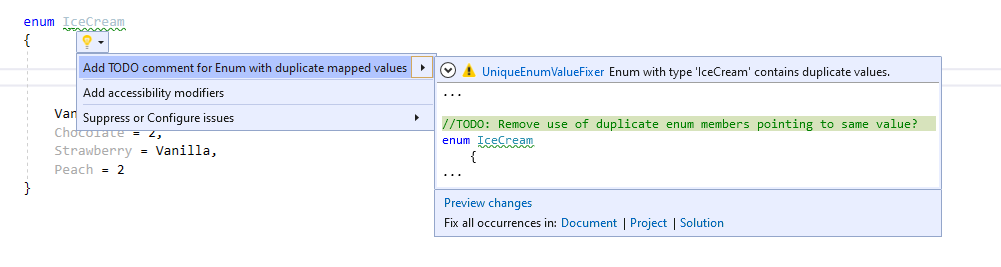
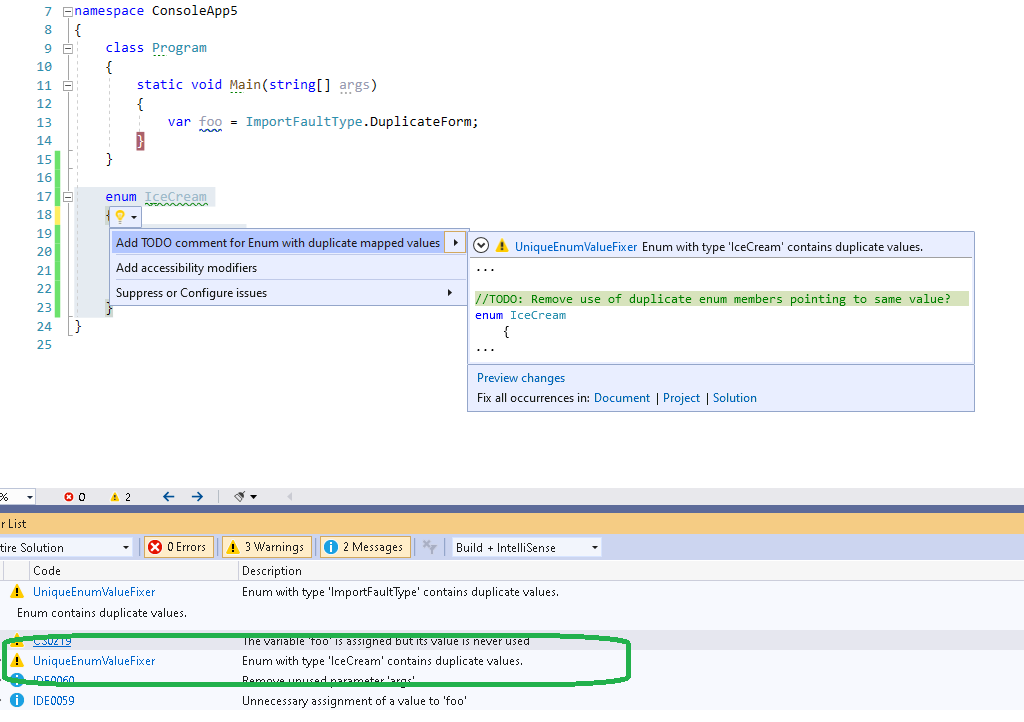
I created a new extension in Visual Studio today! The UniqueEnumValueFixer vs extension is now available here! https://marketplace.visualstudio.com/items?itemName=ToreAurstadIT.EXT001 The extension is actually a Code Fix for Visual Studio. It flags a warning to the developer if an enum contains multiple members mapped to the same value. Having a collision with values for enum causes ambiguity and confusion for the developer. An enum value has not got a single mapping from enum member to integer value. Example like this: Here we see that iceconverted is set to Fudge, which is the last of the colliding valued enum members. This gives code which is not clear and confusing and ambiguous. It is perfectly valid, but programmers will perhaps sigh a bit when they see enums with multiple members mapped to same value. The following sample code shows a violation of the rule:
    enum IceCream
    {
        Vanilla = 0, 
        Chocolate = 2,
        Strawberry = Vanilla,
        Peach = 2
    }

Here, multiple members are mapped to the same value in the enum. Strawberry and Vanilla points to the same value through assignment. And Peach is set to same value as Chocolate. The code fix will show enums containing the violation after compiling the solution in the Errors and Warnings pane of Visual Studio.

   public override void Initialize(AnalysisContext context)
        {
            // TODO: Consider registering other actions that act on syntax instead of or in addition to symbols
            // See https://github.com/dotnet/roslyn/blob/master/docs/analyzers/Analyzer%20Actions%20Semantics.md for more information
            context.RegisterSymbolAction(AnalyzeSymbol, SymbolKind.NamedType);

        }

        private static void AnalyzeSymbol(SymbolAnalysisContext context)
        {
            try
            {
                var namedTypeSymbol = (INamedTypeSymbol)context.Symbol;
                if (namedTypeSymbol.EnumUnderlyingType != null)
                {
                    var valueListForEnum = new List<Tuple<string, int>>();
                    //Debugger.Launch();
                    //Debugger.Break();
                    var typeResolved = context.Compilation.GetTypeByMetadataName(namedTypeSymbol.MetadataName) ?? context.Compilation.GetTypeByMetadataName(namedTypeSymbol.ToString());
                    if (typeResolved != null)
                    {
                        foreach (var member in typeResolved.GetMembers())
                        {
                            var c = member.GetType().GetRuntimeProperty("ConstantValue");
                            if (c == null)
                            {
                                c = member.GetType().GetRuntimeProperties().FirstOrDefault(prop =>
                                    prop != null && prop.Name != null &&
                                    prop.Name.Contains("IFieldSymbol.ConstantValue"));
                                if (c == null)
                                {
                                    continue;
                                }
                            }

                            var v = c.GetValue(member) as int?;
                            if (v.HasValue)
                            {
                                valueListForEnum.Add(new Tuple<string, int>(member.Name, v.Value));
                            }
                        }
                        if (valueListForEnum.GroupBy(v => v.Item2).Any(g => g.Count() > 1))
                        {
                            var diagnostic = Diagnostic.Create(Rule, namedTypeSymbol.Locations[0],
                                namedTypeSymbol.Name);
                            context.ReportDiagnostic(diagnostic);
                        }
                    }
                }
            }
            catch (Exception err)
            {
                Console.WriteLine(err);
            }

        }

The source code is available on Github here: https://github.com/toreaurstadboss/UniqueEnumValuesAnalyzer

Wednesday, 10 June 2020

Creating a self signed certificate with Powershell and preparing it for IIS

I just wrote an automated routine in Powershell to create a self signed certificate.
#Install-Module -Name 'WebAdministration'

Import-Module -Name WebAdministration

function AddSelfSignedCertificateToSSL([String]$dnsname, [String]$siteName='Default Web Site'){
 $newCert = New-SelfSignedCertificate -DnsName $dnsname -CertStoreLocation Cert:\LocalMachine\My
 $binding = Get-WebBinding -Name $siteName -Protocol "https"
 $binding.AddSslCertificate($newCert.GetCertHashString(), "My")
 $newCertThumbprint = $newCert.Thumbprint
 $sourceCertificate = $('cert:\localmachine\my\' + $newCertThumbprint)
 
 $store = new-object system.security.cryptography.X509Certificates.X509Store -argumentlist "Root", LocalMachine
 $store.Open([System.Security.Cryptography.X509Certificates.OpenFlags]"ReadWrite")
 $store.Add($newCert)
 return $newCertThumbprint
}

Write-Host Installing self-signed certificate Cert:\LocalMachine\My and Cert:\LocalMachine\Root ..

$certinstalledThumbprint = AddSelfSignedCertificateToSSL 'someacmeapp.somedomain.net'

Write-Host Added certificate $certinstalledThumbprint to Cert:\LocalMachine\My and Cert:\LocalMachine\Root and set this up as the SSL certificate on Default Web Site.


Thursday, 28 May 2020

Creating an AngularJs directive for a horizontal scroller at top and bottom of HTML container element

I made an AngularJs directive today that adds a horizontal scroller at top and bottom of an HTML container element, such as text area, table or div. The AngularJs directive uses the link function of AngularJs to prepend and wrap the necessary scrolling mechanism and add some Javascript scroll event handlers using jQuery.

import angular from 'angular';

var app = angular.module('plunker', []);
app.controller('MainCtrl', function($scope, $compile) {
  $scope.name = 'Dual wielded horizontal scroller';
});

app.directive('doubleHscroll', function($compile) {
  return {
    restrict: 'C',
    link: function(scope, elem, attr){

      var elemWidth = parseInt(elem[0].clientWidth);

      elem.wrap(`<div id='wrapscroll' style='width:${elemWidth}px;overflow:scroll'></div>`); 
      //note the top scroll contains an empty space as a 'trick' 
      $('#wrapscroll').before(`<div id='topscroll' style='height:20px; overflow:scroll;width:${elemWidth}px'><div style='min-width:${elemWidth}px'> </div></div>`);

      $(function(){
        $('#topscroll').scroll(function(){
          $("#wrapscroll").scrollLeft($("#topscroll").scrollLeft());
        });
        $('#wrapscroll').scroll(function() {
          $("#topscroll").scrollLeft($("#wrapscroll").scrollLeft());
        });

      });  

    }

  };


});


The HTML that uses this directive, restricted to 'C' (class) is then simply using the class 'double-Hscroll' following AngularJs 'snake escaping' naming convention of capitalization and dashes.

<!DOCTYPE html>

<html>
  <head>
    <link rel="stylesheet" href="lib/style.css" />
    <script src="lib/script.js"></script>
    <script
  src="https://code.jquery.com/jquery-3.5.1.js"
  integrity="sha256-QWo7LDvxbWT2tbbQ97B53yJnYU3WhH/C8ycbRAkjPDc="
  crossorigin="anonymous"></script>
  </head>

  <body ng-app="plunker" ng-cloak>
    <div ng-controller="MainCtrl">
      <h1>Hello {{name}}</h1>
      <p>Dual horizontal scroll top and below a text area.</p>
      <textarea noresize class="double-hscroll" rows="10" cols="30">
        lorem ipsum dolores  lorem ipsum dolores
      lorem ipsum dolores
      lorem ipsum dolores sit amen
      lorem ipsum dolores
      lorem ipsum dolores sit amen
      lorem ipsum dolores
      lorem ipsum dolores amen sit
     
      </textarea>
    </div>
  </body>
</html>

Tuesday, 7 April 2020

Writing to Event Log in .Net Core (Tested with .Net Core 3.1)

Writing to the Event Log in .Net Core requires first a Nuget package installation
Install-Package Microsoft.Extensions.Logging.EventLog -Version 3.1.2
Note that the correct version to install depends on the version of .Net Core you are running.The package above was tested OK with .Net Core. Then we need to add EventLog. In the Program class we can do this like so:
using Microsoft.AspNetCore.Hosting;
using Microsoft.Extensions.Configuration;
using Microsoft.Extensions.Hosting;
using Microsoft.Extensions.Logging;
using Microsoft.Extensions.Logging.EventLog;

namespace SomeAcme.SomeApi
{
    public class Program
    {
        public static void Main(string[] args)
        {
            CreateHostBuilder(args).Build().Run();
        }

        public static IHostBuilder CreateHostBuilder(string[] args) =>
            Host.CreateDefaultBuilder(args)
                .ConfigureLogging((hostingContext, logging) =>
                {
                    logging.ClearProviders();
                    logging.AddConfiguration(hostingContext.Configuration.GetSection("Logging"));
                    logging.AddEventLog(new EventLogSettings()
                    {
                        **SourceName = "SomeApi",
                        LogName = "SomeApi",**
                        Filter = (x, y) => y >= LogLevel.Warning
                    });
                    logging.AddConsole();
                })
                .ConfigureWebHostDefaults(webBuilder =>
                {
                    webBuilder.UseStartup();
                });
    }
}
And our appsettings.json file includes setup:
{
  "ConnectionStrings": {
    "DefaultConnection": "Server=.\\SQLEXPRESS;Database=SomeApi;Trusted_Connection=True;MultipleActiveResultSets=true"
  },
  **"Logging": {
    "LogLevel": {
      "Default": "Information",
      "Microsoft": "Warning",
      "Microsoft.Hosting.Lifetime": "Information"
    }
  },**
  "AllowedHosts": "*"
}
We can inject the ILogger instance
using SomeAcme.SomeApi.SomeModels;
using SomeAcme.SomeApi.Services;
using Microsoft.AspNetCore.Mvc;
using Microsoft.Extensions.Logging;
using System.Collections.Generic;

namespace SomeAcme.SomeApi.Controllers
{
    [Route("api/[controller]")]
    [ApiController]
    public class SomeController : ControllerBase
    {
        private readonly ISomeService _healthUnitService;
        private readonly ILogger _logger;

        public SomeController(ISomeService someService, ILogger logger)
        {
            _someService= someService;
            _logger = logger;
        }
        // GET: api/Some
        [HttpGet]
        public IEnumerable GetAll()
        {
            return _someService.GetAll();
        }
    }
}

More advanced use, add a global exception handler inside Configure method of Startup class in .Net Core:
        //Set up a global error handler for handling Unhandled exceptions in the API by logging it and giving a HTTP 500 Error with diagnostic information in Development and Staging
        app.UseExceptionHandler(errorApp =>
        {
            errorApp.Run(async context =>
            {
                context.Response.StatusCode = 500; // or another Status accordingly to Exception Type
                context.Response.ContentType = "application/json";

                var status = context.Features.Get();

                var error = context.Features.Get();
                if (error != null)
                {
                    var ex = error.Error;
                    string exTitle = "Http 500 Internal Server Error in SomeAcme.SomeApi occured. The unhandled error is: ";
                    string exceptionString = !env.IsProduction() ? (new ExceptionModel
                    {
                        Message = exTitle + ex.Message,
                        InnerException = ex?.InnerException?.Message,
                        StackTrace = ex?.StackTrace,
                        OccuredAt = DateTime.Now,
                        QueryStringOfException = status?.OriginalQueryString,
                        RouteOfException = status?.OriginalPath
                    }).ToString() : new ExceptionModel()
                    {
                        Message = exTitle + ex.Message,
                        OccuredAt = DateTime.Now
                    }.ToString();
                    try
                    {
                        _logger.LogError(exceptionString);
                    }
                    catch (Exception err)
                    {
                        Console.WriteLine(err);
                    }
                    await context.Response.WriteAsync(exceptionString, Encoding.UTF8);
                }
            });
        });

And finally a helper model to pack our exception information into.

using System;
using Newtonsoft.Json;

namespace SomeAcme.SomeApi.Models
{
    /// 
    /// Exception model for generic useful information to be returned to client caller
    /// 
    public class ExceptionModel
    {
        public string Message { get; set; }
        public string InnerException { get; set; }
        public DateTime OccuredAt { get; set; }
        public string StackTrace { get; set; }
        public string RouteOfException { get; set; }
        public string QueryStringOfException { get; set; }

        public override string ToString()
        {
            return JsonConvert.SerializeObject(this);
        }
    }
}

The tricky bit here is to get hold of a logger inside the Startup class. You can inject ILoggerFactory for this and just do :

_logger = loggerFactory.CreateLogger();

Where _logger is used in the global error handler above. Now back again to the question of how to write to the event log, look at the source code for SomeController above. We inject ILogger here. Just use that instance and it offers different methods for writing to your configured logs. Since we added in the Program class event log, this happens automatically. Before you test out the code above, run the following Powershell script as administrator to get your event log source:
New-EventLog -LogName SomeApi -SourceName SomeApi
What I like with this approach is that if we do everything correct, the exceptions pops up inside the SomeApi source nicely and not inside the application event log (clutter IMHO).

Sunday, 5 April 2020

Deploying an SQL Express database in Azure Devops pipeline with YAML and generating and updating the database with migrate scripts using EF Core Code First tools

Here a full example of how I achieved running Integration tests using Sql Express in Azure Devops. I had to use the YAML based pipelines so I could use simonauner's approach using Chocolatey to install Sql Express. Make note that I had to install EF Core tools since I use .Net Core 3.1 in this pipeline. Also note that I generate an EF Code First migration SQL file on the fly so that the rigged SQL Express instance is filled with contents. Deploy SQL Express instance in Azure Devops, install and generate and run EF Code first migration sql script to update database with schema and seed data using EF Code First tools.

# ASP.NET Core (.NET Framework)
# Build and test ASP.NET Core projects targeting the full .NET Framework.
# Add steps that publish symbols, save build artifacts, and more:
# https://docs.microsoft.com/azure/devops/pipelines/languages/dotnet-core

trigger:
- feature/testability

pool:
  vmImage: 'windows-latest'

variables:
  solution: '**/*.sln'
  buildPlatform: 'Any CPU'
  buildConfiguration: 'Release'

steps:
- script: choco install sql-server-express
- task: NuGetToolInstaller@1

- task: VisualStudioTestPlatformInstaller@1
  displayName: 'Visual Studio Test Platform Installer'
  inputs:
    versionSelector: latestStable

- task: NuGetCommand@2
  inputs:
    restoreSolution: '$(solution)'

- task: DotNetCoreCLI@2
  displayName: Build
  inputs:
    command: build
    projects: '**/*.csproj'
    arguments: '--configuration Debug' # Update this to match your need

- script: 'dotnet tool install --global dotnet-ef'
  displayName: 'Generate EF Code First Migrations SQL Script Update script'

- script: 'dotnet ef migrations script -i -o %BUILD_ARTIFACTSTAGINGDIRECTORY%\migrate.sql --project .\SomeAcme\SomeAcme.csproj'
  displayName: 'Generate EF Code First Migrations migrate.sql'

- script: 'sqlcmd -S .\SQLEXPRESS -Q "CREATE DATABASE [SomeAcmeDb]"'
  displayName: 'Create database SomeAcmeDb in Azure Devops SQL EXPRESS'

- script: 'sqlcmd -i %BUILD_ARTIFACTSTAGINGDIRECTORY%\migrate.sql -S .\SQLEXPRESS -d SomeAcmeDb'
  displayName: ' Run migrate.sql on SQL EXPRESS in Azure Devops'

# PowerShell
# Run a PowerShell script on Linux, macOS, or Windows
- task: PowerShell@2
  inputs:
    targetType: 'inline' # Optional. Options: filePath, inline
    #filePath: # Required when targetType == FilePath
    #arguments: # Optional
    script: 'gci -recurse -filter *.dll' # Required when targetType == Inline
    #errorActionPreference: 'stop' # Optional. Options: stop, continue, silentlyContinue
    #failOnStderr: false # Optional
    #ignoreLASTEXITCODE: false # Optional
    #pwsh: false # Optional
    #workingDirectory: # Optional

- task: VSTest@2
  displayName: 'VsTest - testAssemblies'
  inputs:
    testAssemblyVer2: |
     **\*SomeAcme.Tests.dll
     !**\*TestAdapter.dll
     !**\obj\**
    vsTestVersion: toolsInstaller
    testFiltercriteria: 'Category=IntegrationTest'
    runInParallel: false
    codeCoverageEnabled: false
    testRunTitle: 'XUnit tests SomeAcme solution integration test starting'
    failOnMinTestsNotRun: true
    rerunFailedTests: false

Mocking HttpClient in .Net core 3 with Moq

I worked with HttpClient today and needed to write some unit tests. Here is how I did it. First off, we need to define an HttpClientFactory interface like this:
    public interface IHttpClientFactory
    {
        HttpClient CreateHttpClient();
    }
Your API code must then not directly create an http client, but pass in a IHttpClientFactory instance, allowing for tailored functionality such as mocking / unit testing. A default implementation could be:
  public class DefaultHttpClientFactory : IHttpClientFactory
        {
            public HttpClient CreateHttpClient()
            {
                return new HttpClient();
            }
        }
And a mock implementation using Moq then looks like this:

using Moq;
using Moq.Protected;
using System.Net;
using System.Net.Http;
using System.Threading;
using System.Threading.Tasks;

namespace SomeAcme.SomeApi.Test
{
    public class MockHttpClientFactory : IHttpClientFactory
    {
        private HttpResponseMessage _httpContentMessage;

        public HttpClient CreateHttpClient()
        {
            return new HttpClient(CreateMockedHttpMessageHandler());
        }

        private HttpMessageHandler CreateMockedHttpMessageHandler()
        {
            var handlerMock = new Mock<HttpMessageHandler>(MockBehavior.Strict);
            handlerMock
                .Protected()
                // Setup the PROTECTED method to mock
                .Setup<Task<HttpResponseMessage>>(
                    "SendAsync",
                    ItExpr.IsAny<HttpRequestMessage>(),
                    ItExpr.IsAny<CancellationToken>()
                )
                // prepare the expected response of the mocked http call
                .ReturnsAsync(SetupHttpResponseMessage())
                .Verifiable();

            handlerMock
                .Protected()
                // Setup the PROTECTED method to mock
                .Setup(
                    "Dispose",
                    ItExpr.IsAny<bool>()
                )
                // prepare the expected response of the mocked http call
                .Verifiable();
            return handlerMock.Object;
        }

        /// <summary>
        /// Set up the desired http response of unit tests
        /// </summary>
        /// <param name="statusCode"></param>
        /// <param name="responseJson"></param>
        public void SetHttpResponseMessage(HttpStatusCode statusCode, string responseJson)
        {
            _httpContentMessage = new HttpResponseMessage
            {
                StatusCode = statusCode,
                Content = new StringContent(responseJson)

            };

        }

        private HttpResponseMessage SetupHttpResponseMessage()
        {
            if (_httpContentMessage != null)
                return _httpContentMessage;
            return new HttpResponseMessage()
            {
                StatusCode = HttpStatusCode.OK,
                Content = new StringContent("[{'id':1,'value':'1'}]")
            }; //return default dummy implementation for easy green testing of HttpClient..
        }
    }
}
The key is to implement a mocked HttpMessageHandler which is then injected into the real HttpClient class. And also expose a method SetupHttpResponseMessage() allowing unit tests to specify desired http status code and json payload in the response. This is a very basic approach of unit testing HttpClient, so you can get code coverage of your HttpClient and related code in the application layer where your use it. Make sure you now inject the MockHttpClientFactory into your code and initialize it in your testse setting the SetupHttpResponseMessage. Tests should go a green again despite you actually use the HttpClient (with a mocked HttpMessageHandler) !

Friday, 3 April 2020

User friendly and Flexible numeric textbox for decimal numbers in WPF

Adapting WPF to allow a numeric textbox in WPF sounds very trivial, but it is not! A user friendly textbox in WPF couldhave different aspects. It could be possible to: - Only allow numbers or decimal separator - Possible to specify number of digits for integer part and number of digits for decimal part - Specify an empty default value - Still rely on default components such as WPF Textbox The following WPF Converter allows to restrict user input using ConvertBack method. Usually a developer implements the Convert method to transform output, here we use ConvertBack to filter input to only allow numbers or decimal separator.

NumericFormatConverter


using Hemit.OpPlan.Common;
using System;
using System.Globalization;
using System.Linq;
using System.Threading;
using System.Windows.Data;
namespace Hemit.OpPlan.Client.Infrastructure.Converters
{
    public class NumericFormatConverter : IValueConverter
    {
        public int IntegerLength { get; set; }
        public int DecimalLength { get; set; }
        public string DefaultValue { get; set; }
        public object Convert(object value, Type targetType, object parameter, CultureInfo culture)
        {
            return value;       
        }
        public object ConvertBack(object value, Type targetType, object parameter, CultureInfo culture)
        {
            if (value == null)
                return DefaultValue;
            string adjustedValue = AdjustValueToAcceptingFormat(value.ToString());
            return adjustedValue;
        }
        private string AdjustValueToAcceptingFormat(string value)
        {
            if (string.IsNullOrEmpty(value))
                return DefaultValue;
            char decimalSeparator = Thread.CurrentThread?.CurrentCulture?.NumberFormat?.NumberDecimalSeparator.ToCharArray().First() ?? ',';
            string[] compounds = value.Split(new[] { decimalSeparator });
            if (compounds.Length <= 0)
            {
                return DefaultValue; //default to zero
            }
            if (compounds.Length == 1)
            {
                return NumericDigits(compounds[0], decimalSeparator);
            }
            return $"{NumericDigits(compounds[0], decimalSeparator).Truncate(3)}{decimalSeparator}{NumericDigits(compounds[1], decimalSeparator).Truncate(1)}";
        }
        private static string NumericDigits(string input, char decimalSeparator)
        {
            return string.Join("", input.ToCharArray().Where(ch => Char.IsDigit(ch) || ch == decimalSeparator)).Truncate(3);
        }
    }
}

If you rely on MVVM, you can bind up a numeric value with a proxy property with datatype string for flexible input.

   [State]
   [NotifyPropertyChanged(true)]
   [AffectsOtherProperty("BodyMassIndex")]
   [Range(0.0, 500, ErrorMessage = @"Max Weight is surpassed")]
   public double? Weight { get; set; }

   private string _weightInputValue;

   public string WeightInputValue
   {
       get { return _weightInputValue; }
       set
       {
           if (_weightInputValue != value)
           {
               _weightInputValue = value;
               double weight;
               if (double.TryParse(_weightInputValue, out weight))
               {
                   Weight = weight;
               }
               RaisePropertyChanged(() => WeightInputValue);
           }
       }
   }

Never mind the Postsharp aspects for State, NotifyPropertyChanged and AffectsOtherProperty listed here, they are not necessary in your use case. But shows a real world scenario. In WPF frontend you can then bind up the WPF converter like this:

      <TextBlock Grid.Row="7" Grid.Column="2" Margin="2" Text="Vekt (kg)" VerticalAlignment="Center" HorizontalAlignment="Left" />
                            <TextBox Grid.Row="7" Grid.Column="4" MaxLength="5" Height="24" behaviors:TextBoxRegExBehavior.RegularExpressionProperty="^\d+[,|.]*\d*$" FontWeight="Normal"
                             HorizontalAlignment="Left"
                             behaviors:TextBoxRegExBehavior.MaxLength="5" behaviors:TextBoxRegExBehavior.MustParseToType="{x:Type sys:Double}" behaviors:TextBoxRegExBehavior.EmptyValue="0" 
                             Margin="2,2,2,2" Width="40" Text="{Binding WeightInputValue, Converter={StaticResource numericFormatConverter}, ConverterCulture={x:Static gl:CultureInfo.CurrentCulture}, UpdateSourceTrigger=PropertyChanged, ValidatesOnExceptions=true}" 
                             Style="{StaticResource ReadOnlyTextBoxStyleHidingZero}" IsReadOnly="{Binding IsEditMode, Converter={StaticResource invertedBoolConverter}}" TabIndex="35" />

Again, much custom stuff here, but the key thing to notice is that you only need to make sure you bind against the proxy property of type string, the WPF converter numericFormatConverter handles the formatting of the input.
   <converters:NumericFormatConverter x:Key="numericFormatConverter" IntegerLength="3" DecimalLength="1" DefaultValue=""></converters:NumericFormatConverter>

Friday, 28 February 2020

Strongly typed ConfigurationManager in .NET Framework

Handling configuration files in .NET Framework is often tedious. You retrieve the app setting as a string and must then parse it out. Dont you wish we could have a generic method to get a strongly typed app setting instead and spare ourselves with some code ? Sure you can!

using System;
using System.ComponentModel;
using System.Configuration;

namespace Hemit.OpPlan.Common.Extensions
{

    /// <summary>
    /// Utility methods for ConfigurationManager. Also included methods for handling OpenExeConfiguration (running process configuration, for example in tests and installers)
    /// </summary>
    public static class ConfigurationManagerWrapper
    {
        /// <summary>
        /// Sets an appsetting for the exe configuration
        /// </summary>
        /// <param name="appsetting"></param>
        /// <param name="value"></param>
        public static void SetAppsettingForExecConfiguration(string appsetting, object value)
        {
            System.Configuration.Configuration config = ConfigurationManager.OpenExeConfiguration(ConfigurationUserLevel.None);
            config.AppSettings.Settings[appsetting].Value = Convert.ToString(value);
            config.Save(ConfigurationSaveMode.Modified);
        }

        /// <summary>
        /// Sets an appsetting for the exe configuration
        /// </summary>
        /// <param name="appsetting"></param>
        /// <param name="value"></param>
        public static string GetAppsettingExecConfiguration(string appsetting, object value)
        {
            return ConfigurationManager.AppSettings[appsetting];
        }

        /// <summary>
        /// Sets an appsetting for the exe configuration
        /// </summary>
        /// <param name="appsetting"></param>
        /// <param name="value"></param>
        public static void SetAppsettingForConfiguration(string appsetting, object value)
        {
            ConfigurationManager.AppSettings[appsetting] = Convert.ToString(value);
        }

        /// <summary>
        /// Sets an appsetting for the exe configuration
        /// </summary>
        /// <param name="appsetting"></param>
        /// <param name="value"></param>
        public static string GetAppsettingForExecConfiguration(string appsetting, object value)
        {
            System.Configuration.Configuration config = ConfigurationManager.OpenExeConfiguration(ConfigurationUserLevel.None);
            return config.AppSettings.Settings[appsetting].Value;
        }


        /// <summary>
        /// Use this extension method to get a strongly typed app setting from the configuration file.
        /// Returns app setting in configuration file if key found and tries to convert the value to a specified type. In case this fails, the fallback value
        /// or if NOT specified - default value - of the app setting is returned
        /// </summary>
        /// <typeparam name="T"></typeparam>
        /// <param name="appsettingKey"></param>
        /// <param name="fallback"></param>
        /// <returns></returns>
        public static T GetAppsetting<T>(string appsettingKey, T fallback = default(T))
        {
            string val = ConfigurationManager.AppSettings[appsettingKey] ?? "";
            if (!string.IsNullOrEmpty(val))
            {
                try
                {
                    Type typeDefault = typeof(T);
                    var converter = TypeDescriptor.GetConverter(typeof(T));
                    return converter.CanConvertFrom(typeof(string)) ? (T)converter.ConvertFrom(val) : fallback;
                }
                catch (Exception err)
                {
                    Console.WriteLine(err); //Swallow exception
                    return fallback;
                }
            }
            return fallback;
        }

    }
}


Thursday, 20 February 2020

Generic method ShouldAll for FluentAssertions

This is a simple etension method for Fluent Assertions called ShouldAll that can be run on a collection and you can pass in your predicate of your choice and see the output. Consider this unit test:


         var oneyearPeriodComparions = new []
            {
                new ReferencePeriodComparisonResult { ReferencePeriod = reportPeriod2017 , CalculatedPeriod = calculatedReportPeriod2017.First() },
                new ReferencePeriodComparisonResult { ReferencePeriod = reportPeriod2017 , CalculatedPeriod = calculatedReportPeriod2017.Last()},
                new ReferencePeriodComparisonResult { ReferencePeriod = reportPeriod2018 , CalculatedPeriod = calculatedReportPeriod2018.First()},
                new ReferencePeriodComparisonResult { ReferencePeriod = reportPeriod2018 , CalculatedPeriod = calculatedReportPeriod2018.Last() },
                new ReferencePeriodComparisonResult { ReferencePeriod = reportPeriod2019 , CalculatedPeriod = calculatedReportPeriod2019.First() },
                new ReferencePeriodComparisonResult { ReferencePeriod = reportPeriod2019 , CalculatedPeriod = calculatedReportPeriod2019.Last() }
            };

            oneyearPeriodComparions.ShouldAll(comparison => comparison.CalculatedPeriod.ReportPeriodStartDateAndEndDateIsEqualTo(comparison.ReferencePeriod), outputPassingTests:true);


This uses this extension test for Fluent Assertions:

using FluentAssertions;
using System;
using System.Collections.Generic;
using System.Linq.Expressions;

namespace SomeAcme.SomeLib
{

    public static class FluentAssertionsExtensions
    {

        /// <summary>
        /// Inspects that all tests are passing for given collection and given predicate
        /// </summary>
        /// <typeparam name="T"></typeparam>
        /// <param name="instances"></param>
        /// <param name="predicate"></param>
        /// <param name="outputFailingTests"></param>
        public static void ShouldAll<T>(this IEnumerable<T> instances, Expression<Func<T, bool>> predicate, bool outputFailingTests = true, bool outputPassingTests = false)
        {
            foreach (var instance in instances)
            {
                var isTestPassing = predicate.Compile().Invoke(instance);
                if (!isTestPassing && outputFailingTests || outputPassingTests)
                    Console.WriteLine($@"Test Running against object: {instance} Test Pass?:{isTestPassing}");
                isTestPassing.Should().Be(true);
            }
        }
    }

}